
Ever feel like your phone's battery life just falls off a cliff after a year? You're not imagining it. A battery charging limiter is a simple tool designed to stop that from happening, and it works by preventing your phone from charging all the way to 100%.
It might sound strange, but this one small change can dramatically extend your battery's long-term health and keep it performing like new for years, not months. It works by cutting down on the hidden stress that slowly kills batteries over time.
This guide explains how charge limiting works. If you already want the device, Chargie is a hardware charging limiter for phones and laptops. If you only want to cap what you already own, follow our step-by-step guide to limiting battery charge to 80%.
The Hidden Stress That's Degrading Your Phone Battery
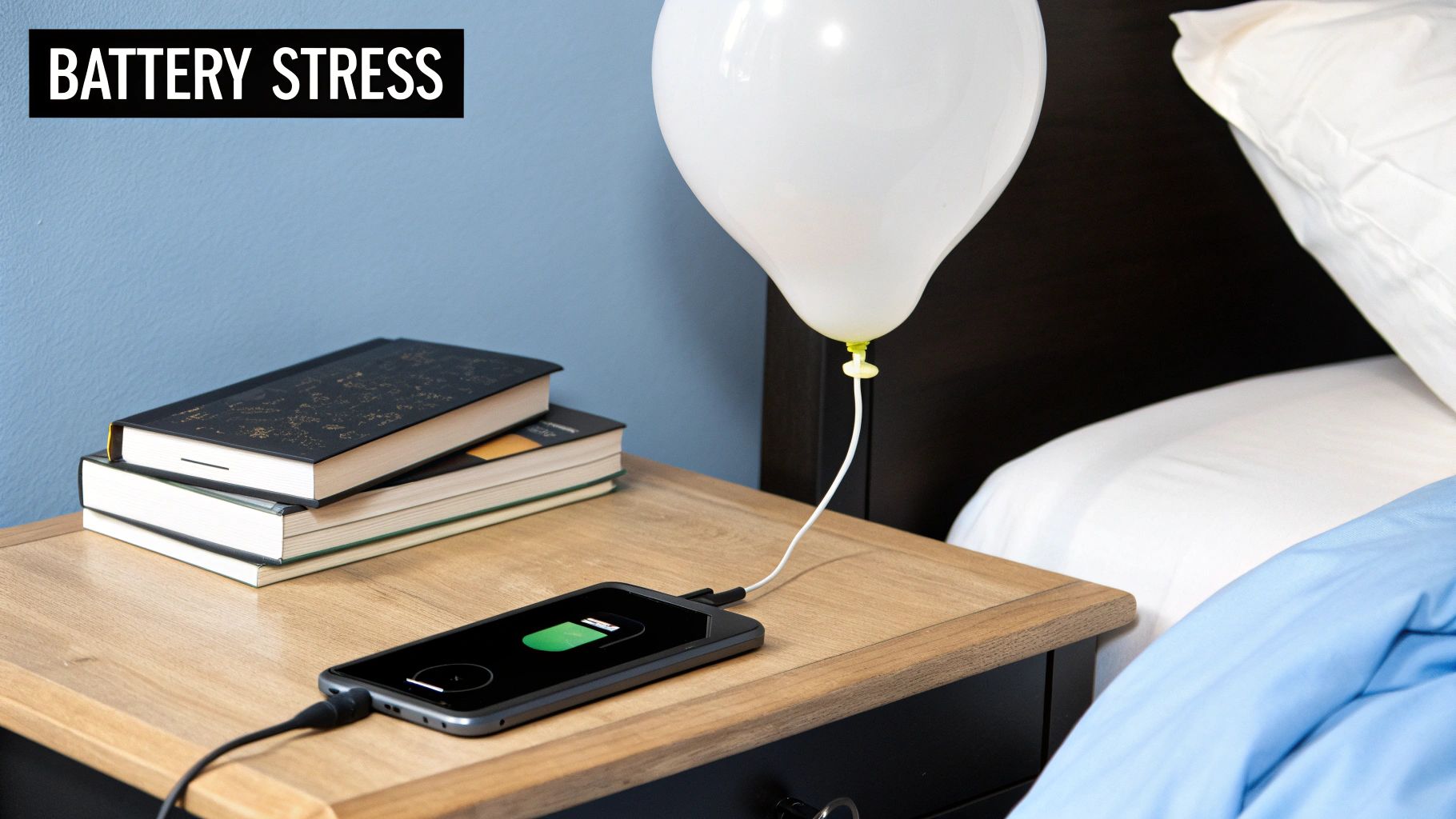
Think of your phone’s battery like a balloon. Every time you charge it to 100%, you're stretching that balloon to its absolute maximum. Leaving it plugged in overnight is like holding it fully stretched for hours.
That constant tension puts a lot of stress on the battery's insides. This is the real reason batteries get old—it permanently damages them, reducing their ability to hold a charge.
Finding the Charging Sweet Spot
If you look at how a battery charges, the real damage happens in that final stretch from 80% to 100%. Pushing the battery into this high-stress state is like revving a car's engine into the red zone; it causes a ton of unnecessary wear and tear.
Simply avoiding this high-stress zone can drastically slow down the aging process. For most people, the "sweet spot" for daily charging is right around 80%. This gives you more than enough power for the day while avoiding the worst of the damage.
A battery charging limiter acts as a bodyguard for your device's long-term health. It ensures the battery stays in a healthier, lower-stress state, preserving its ability to hold a charge for years instead of months.
To put it in perspective, here’s a quick look at how different charge levels can impact your battery’s lifespan.
How Charge Levels Impact Battery Health
| Maximum Charge Level | Relative Stress on Battery | Estimated Lifespan Improvement |
|---|---|---|
| 100% | Very High | Baseline (standard lifespan) |
| 90% | High | Up to 2x longer life |
| 80% | Moderate | Up to 4x longer life |
| 70% | Low | Up to 8x longer life |
As you can see, even small changes can make a huge difference. You don't have to be perfect, but regularly stopping the charge before it hits the top can multiply your battery's useful life.
The Broader Impact of Smart Charging
This isn't just about phones. The idea of limiting a charge is a key part of bigger battery management systems (BMS), which are vital for everything from laptops to electric cars.
In fact, the BMS market is expected to grow from USD 9.84 billion in 2025 to USD 46.47 billion by 2033. That huge growth, as noted by Straits Research, shows just how important smart battery care has become. These systems are designed to keep batteries from working outside their safe limits, protecting both their lifespan and your safety.
Ultimately, managing how your device charges is about more than convenience. It’s about protecting your investment and making sure you have a reliable device when you need it. Of course, other factors like high temperatures and super-fast charging also play a big role, which you can learn about in our detailed guide on battery degradation.
How a Battery Charging Limiter Protects Your Device
So, how does a battery charging limiter actually work its magic? Think of it like a smart gatekeeper for your phone or laptop’s battery. Instead of just letting electricity flood in until the battery is full, this gatekeeper stands guard.
While your device is plugged in, the limiter keeps a close eye on the battery level. Once it hits the target you’ve set—say, 80%—it steps in and tells the charger to cut the power. That’s it.
This one simple move is the secret to long-term battery health. It keeps your device out of that high-stress zone between 80% and 100%, which is especially damaging during long overnight charging sessions where a battery can sit at full capacity for hours.
Two Main Types of Limiters
You’ll generally find two different ways to use this battery-saving strategy. Knowing the difference will help you figure out what's best for you.
- Software-Based Limiters: These are features you see built into some newer gadgets. They're convenient since there's nothing extra to buy, but they’re often a one-size-fits-all solution, usually stuck at an 80% limit with no way for you to make adjustments.
- External Hardware Limiters: This is a physical device that sits between your charger and your charging cable. It’s a much more powerful and flexible approach, giving you full control over the charging process, completely separate from your device's software.
By creating a hard stop for the electricity, a battery charging limiter dramatically reduces the wear and tear on the battery. This small step can multiply your battery’s effective lifespan, preserving its ability to hold a charge for years.
How It Prevents Damage
Every time your battery charges all the way to 100%, the high electrical pressure puts a ton of strain on its internal parts. Do this over and over, and you cause permanent damage. The battery just can't hold as much power as it did when it was new. It's exactly why a two-year-old phone can barely make it to dinner time.
A battery charge limiter tackles this problem head-on. By keeping the charge in a healthier, less-stressed range, it minimizes that high-pressure punishment. You can think of it as giving your battery some breathing room, letting it operate in a relaxed state instead of a stressed-out one. When looking into common battery issues, it’s worth exploring practical solutions for gaming laptop battery life problems and other high-demand devices, where this principle is a game-changer.
This proactive care means your battery holds onto its original capacity for way longer, making sure your device stays reliable and useful for years to come.
Comparing Built-In Software vs Hardware Solutions
When it comes to protecting your battery, not all charge limiters are the same. The two main options are the built-in software features that come with your phone, or a separate hardware device.
Each one has its pros and cons, and understanding the difference is key to picking the right level of protection for your gear.
Many newer phones and laptops come with a software-based battery charge limiter built right into the system. You've probably seen it—a simple switch in your settings that stops the charge at 80%. The biggest plus here is convenience. It’s already on your device, and it’s free. No extra purchase needed.
But that simplicity is also its biggest weakness. These built-in tools are a one-size-fits-all solution, offering almost no room to customize. You're stuck with whatever limit the manufacturer decided on, usually 80%, which might not be what you need. If you have a long day ahead and need a full battery, you have to dig into the settings, turn it off, and then—hopefully—remember to turn it back on later.
The Power of Dedicated Hardware
This is where external hardware solutions, like our own Chargie, completely change the game. A hardware battery charge limiter is a small gadget that physically sits between your charger and your phone's cable. Think of it as a smart gatekeeper for your electricity.
This approach gives you a true, physical "hard stop" to the electricity flowing into your battery. It's far more reliable than a software command, which can sometimes fail or get ignored by a system update.
Most importantly, it unlocks a much deeper level of control. Instead of being locked into a rigid 80% limit, you can set the charging cap to any precise level you want, whether that's 85%, 92%, or anything in between.
With hardware, you’re not just limiting the charge; you're taking full command of your battery’s health. This allows for scheduled charging, so your phone can top up to 100% just before you wake up, giving you a full battery without the overnight stress.
The companion app gives you an easy-to-use dashboard for setting these custom rules. From there, you can schedule charging times and set those exact battery level targets with just a few taps.
This level of fine-tuned control is exactly why dedicated hardware is the better choice for anyone serious about long-term battery care. In fact, you can see a detailed breakdown of how Chargie's hardware approach beats Apple's built-in software limiter in our head-to-head comparison.
On top of that, advanced hardware limiters can also reduce the charging power to keep heat down—another silent killer of battery health. This idea of smarter charging is catching on everywhere. The industrial battery charger market is projected to more than double, from USD 2.735 billion in 2025 to USD 6.184 billion by 2035. This massive growth is driven by the demand for smarter tech that preserves battery life. When you look at professional-grade solutions, you see technologies like smart controllers for comprehensive battery management becoming the standard.
How to Set a Battery Charge Limit on Each Device
The right way to cap your charge depends on what you’re using. Below is a quick, platform-by-platform rundown of the built-in options on Android phones, Windows laptops, MacBooks, and iPhones—plus where each one falls short, and why a single hardware limiter solves all of them at once.
Android Battery Charge Limit
Many newer Android phones now include a native battery charge limiter. On most Samsung Galaxy models it’s Settings > Battery > Battery Protection (the “Maximum” option caps charging at 80%). On Google Pixel it appears as Adaptive Charging, which delays the final top-up until just before your alarm. OnePlus, Xiaomi, and Sony ship similar toggles under battery or optimized-charging menus.
The catch: almost every Android option is locked to a fixed 80% and can’t be set to a custom level. Older phones—and most budget models—have no built-in limiter at all. That’s exactly the gap an external hardware limiter like Chargie fills, working on any Android device regardless of brand or age.
Windows Laptop Battery Limiter (Lenovo, Dell, HP, ASUS)
Windows itself has no universal charge-limit setting, so it’s left to each manufacturer’s utility:
- Lenovo: Enable Conservation Mode in Lenovo Vantage to cap charging at roughly 80%.
- Dell: Open Dell Power Manager and choose the Primarily AC Use or a Custom charge threshold (e.g., start 50% / stop 80%).
- HP: Use HP’s Battery Health Manager in the BIOS to switch to “Maximize my battery health.”
- ASUS: Set Battery Health Charging to Balanced (80%) or Maximum Lifespan (60%) in MyASUS.
These tools work well—but only on that specific brand’s machine, and they usually offer just two or three preset thresholds. If you own laptops from more than one maker, or want a precise custom cap, a hardware limiter gives you one consistent control across every laptop you own.
How to Limit Charging on a MacBook (macOS)
macOS uses Optimized Battery Charging (System Settings > Battery), which learns your routine and holds the charge around 80% until you typically unplug. Apple Silicon MacBooks add an 80% limit toggle. It’s automatic and hands-off, but you can’t choose your own percentage, and it depends on macOS correctly predicting your schedule—something a physical hard stop never has to guess at.
Can You Set a Charge Limit on iPhone?
Not to a custom number—yet. iPhone offers Optimized Battery Charging on every recent model, and iPhone 15 and later added an 80% Charge Limit under Settings > Battery > Charging. That’s it: 80% or nothing, and only on the newest handsets. Older iPhones have no charge cap at all. To stop charging at an exact level—or to cap an iPhone 14 or earlier—you need an external limiter. (We break this down in detail in our Chargie vs Apple’s built-in limiter comparison.)
The Common Thread: One Limiter for Every Device
Notice the pattern—every built-in option is locked to a fixed percentage, tied to one brand, and often missing on older hardware. A hardware battery charge limiter like Chargie sidesteps all of it: it plugs in between your charger and cable, works on virtually any USB-powered phone, tablet, or laptop, and lets you set any cap you like with scheduled top-ups. One device, every gadget, full control.
Charging a laptop? See the 100W Chargie for Laptops.
Why Chargie Offers Superior Battery Protection
Software-based limiters are a good first step, but they’re a basic tool. When you want serious, smart protection for your battery, you need a hardware solution like Chargie. It's more than just a setting; it's a complete system—a physical device paired with a smart app—that gives you real control over how your devices charge.
Think of the small hardware piece as the muscle. It sits between your charger and your phone, acting as a physical smart switch. It doesn't just ask the phone to stop charging; it physically cuts the power. This is a far more reliable way to do things, ensuring the charge stops exactly when you want it to, every single time.
The app, then, is the brains behind the operation. It tells the hardware what to do, letting you create custom rules that go far beyond a simple 80% limit. This combination of smart hardware and intelligent software is what makes all the difference.
Going Beyond the Basics
With a dedicated hardware limiter, you unlock a whole set of features designed to maximize your battery’s lifespan and make your life easier. These are capabilities that address how people actually use their devices, something a simple software toggle just can't do.
Here’s what you get:
- Precise Percentage Control: You’re not stuck with the manufacturer's 80% limit. Feel like 82% is the sweet spot for tomorrow? Or maybe 87%? You can set the charging cap to whatever level you want, whenever you want.
- Intelligent Scheduling: This is where it gets really smart. You can plan your charging so your battery sits in the ideal 50-70% range all night, then automatically tops up to 100% just minutes before your alarm goes off. You wake up to a full battery without putting it through hours of high-level stress.
- Power and Heat Reduction: Chargie can actually limit the amount of power flowing into your device. Less power means less heat, and since heat is one of the biggest killers of batteries, this adds another powerful layer of protection.
To put it simply, here’s a quick look at how the two approaches stack up.
Feature Comparison: Built-in Limiter vs Chargie
| Feature | Typical Built-in Software Limiter | Chargie Hardware Limiter |
|---|---|---|
| Charge Level Control | Fixed, usually at 80% | Fully customizable (1% to 100%) |
| Scheduling | Basic or non-existent | Advanced scheduling with top-up timing |
| Power Management | None | Actively limits power draw to reduce heat |
| Overnight Charging Strategy | Stays at 80% all night | Can maintain a lower level (e.g., 50%) and top up just before you wake |
| Method of Control | Software request (can be ignored) | Physical power cutoff (guaranteed stop) |
| Device Compatibility | Limited to specific phone models | Works with virtually any USB-powered device |
As you can see, the difference is night and day. One is a basic safety net, while the other is a complete battery care system.
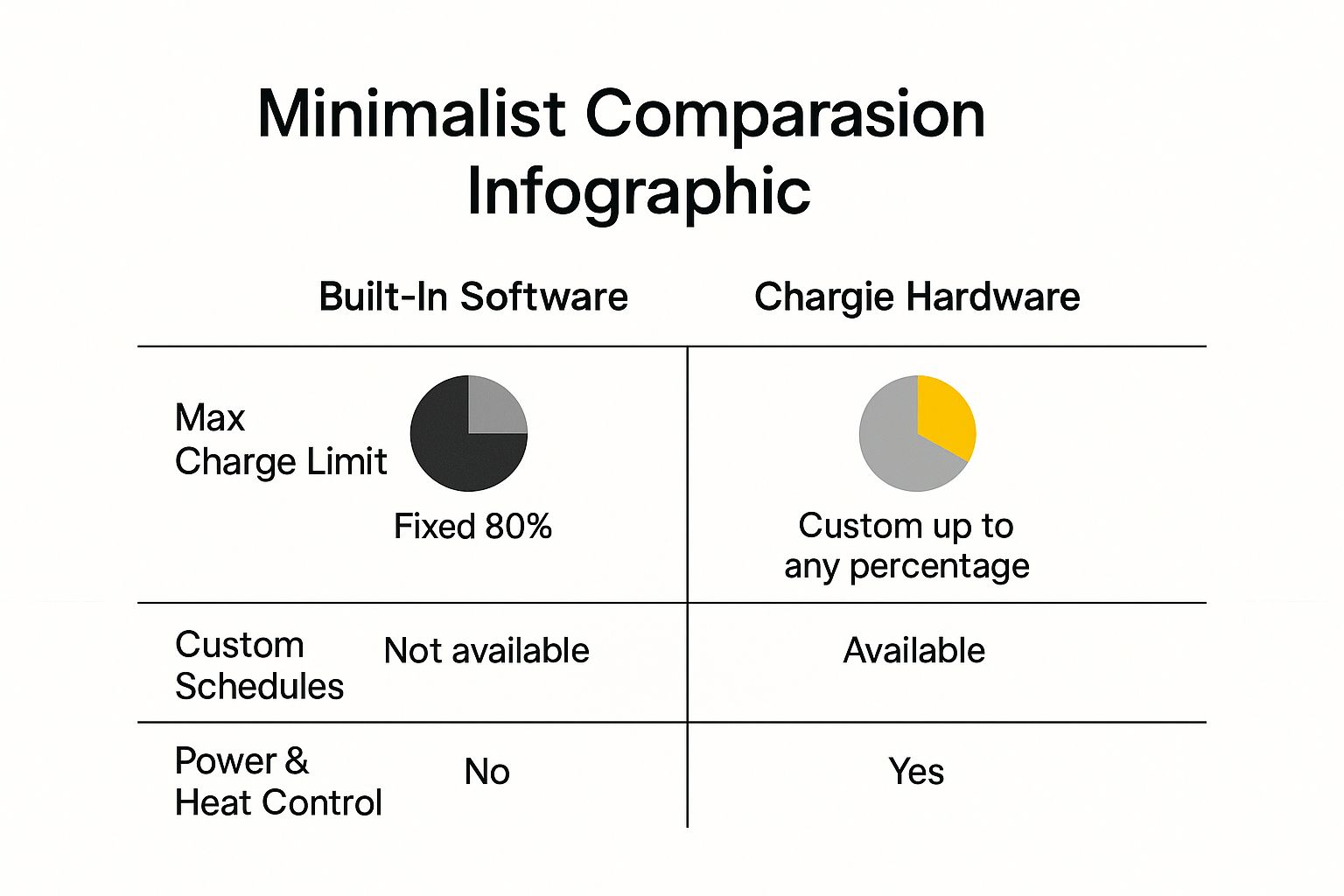
This visual really drives the point home. A built-in limiter offers one fixed benefit. A hardware solution like Chargie delivers a multi-part strategy for keeping your battery healthy for the long haul.
A Smart Investment, Not a Gadget
At the end of the day, using Chargie isn't about adding another tech gadget to your life. It’s a smart financial decision. By dramatically slowing down how quickly your battery ages, you can avoid costly battery replacements and get more years out of your expensive smartphones, tablets, and laptops.
Chargie pays for itself by preventing the early death of your device's battery. This simple tool ensures your technology performs at its best for years, saving you money and reducing electronic waste.
And this level of protection isn't just for phones. As you can see in our guide on how to use Chargie to future-proof any device's battery, its benefits extend to all your tech. When you invest in proper battery care, your devices stay reliable, perform better, and hold their value for much longer.
What This Means For You in the Real World
Alright, let's move beyond the technical details. What does all this smart charging stuff actually mean for you and your phone in the real world? It's about more than just a healthier battery; it translates into real savings, a phone that just works better, and a lot less stress.

The most direct impact is on your wallet. A new battery for a modern smartphone can easily set you back $100 or more. If you have to replace the whole phone, you're talking hundreds. By simply slowing down how fast your battery wears out, you can put off—or even skip—those costs entirely.
Double Your Phone's Lifespan
Think about how often people get new phones. Most of us upgrade every couple of years. It’s usually not because the camera is bad or the phone feels slow; it's because the battery is shot. A phone that’s dead by 3 PM is basically useless.
Now, imagine this instead: by using a battery charge limiter and adopting a smarter charging routine, that same phone could easily give you solid all-day battery life for four, five, or even more years. You're not just saving a part; you're effectively doubling the useful life of a device you spent a lot of money on.
A battery charge limiter transforms your phone from a two-year disposable gadget into a reliable tool you can count on for the long haul.
Better Performance and Day-to-Day Reliability
A healthy battery isn't just about lasting longer between charges. It’s also about delivering power smoothly. As batteries get older and weaker, they struggle to provide steady power, which can cause your phone to feel sluggish or even shut down unexpectedly, especially when you're doing something that uses a lot of energy.
Keep your battery in good shape, and your device will run smoothly for years. This means you can walk out the door with confidence, knowing your phone will make it through the day without you having to hunt for an outlet or carry around a heavy power bank. That kind of reliability is priceless.
A Smarter, Greener Approach to Tech
Finally, let's talk about the bigger picture. Every phone that gets thrown out early adds to the massive global problem of e-waste. By making your gadgets last longer, you’re doing your part to reduce your environmental impact. It's a small change with a big effect.
This same idea is being used in huge ways. For instance, by early 2025, massive battery storage systems made up almost 14% of California's entire power grid. These systems rely on smart charge limiting to stay stable and protect billions in investment. It just goes to show how crucial this technology is, from our pockets to our power plants. You can learn more about how battery storage is shaping our energy future from CAISO reports.
Got Questions About Battery Limiting? Let's Clear Them Up.
Even after seeing how much this helps, it's normal to have a few questions before you jump in. We've all been trained for years to just plug our phones in and leave them until they hit 100%. Breaking that habit can feel a little weird at first.
To clear up any doubts, here are the most common questions people ask, along with simple, straight-up answers to help you feel good about making this battery-saving change.
Is It Really That Bad to Charge My Phone to 100 Percent?
In a word, yes. Now, doing it once won’t kill your battery, but making a habit of charging to 100% and leaving it there is one of the fastest ways to wear it out. The final push from 80% to 100% is where the real stress happens inside the battery.
Think of it like stretching a rubber band all the way to its breaking point and just holding it there for hours. Do that enough times, and it's going to lose its snap and become weak.
By stopping the charge at around 80%, you keep the battery out of that high-stress red zone. It's a small change that makes a huge difference, cutting down on wear and tear and helping your battery hold a healthy, long-lasting charge for years, not months.
Will Using a Charge Limiter Void My Phone's Warranty?
This is a big one, but you can relax. Using an external hardware battery charging limiter like Chargie will absolutely not void your phone's warranty. Not a chance.
These little gadgets are smart, but they don't change anything inside your phone. All they do is manage the power flowing from your charger. Think of it as a smart on/off switch for the electricity.
As far as your phone is concerned, it just sees the charger being unplugged when it hits the right percentage. The limiter doesn't mess with your phone's software, touch its internal hardware, or interfere with how it works at all. It's a completely safe, warranty-friendly way to protect your investment.
"A battery charging limiter works outside of your device's operating system. It simply controls the external power source, making it a safe and universally compatible solution for battery preservation."
Can I Still Get a Full Day's Use If I Only Charge to 80 Percent?
For most people, the answer is a big, resounding "yes." When a phone is new, its battery is at peak performance, and 80% of that is more than enough power to get you through a typical day.
But here’s the real magic behind this strategy: it's all about how it performs over time.
Think about the alternative. Someone who always charges to 100% might find their battery's actual maximum capacity has dropped to just 70% after only a couple of years. At that point, their "full" charge is actually less than the 80% you've been carefully maintaining all along.
Plus, smart tools like Chargie give you the best of both worlds with scheduling. You can let the battery sit at a happy, healthy level overnight, then have it automatically top up to 100% just before your alarm goes off. You get all the battery health benefits and a full tank right when your day starts.
Ready to take back control of your device's long-term health? The Chargie hardware limiter gives you the power to set exact charging limits, build smart schedules, and seriously extend your battery's lifespan across every phone, tablet, and laptop you own — no matter the brand or age.
Got a laptop? Grab the Chargie for Laptops (100W) · or browse the full range.

USB-C charge limiter that stops at your set battery level, so your battery never sits at 100% overnight. Extends battery lifespan by years. Works with any USB-C charger.

Limit your laptop charge to 80% via USB-C. Works with MacBooks, Dell, HP, Lenovo and most USB-C laptops up to 100W.
Protect Your Battery with Chargie
The world's first hardware charge limiter. Set a charge limit on any phone, tablet, or laptop — extend battery life by up to 4x.