
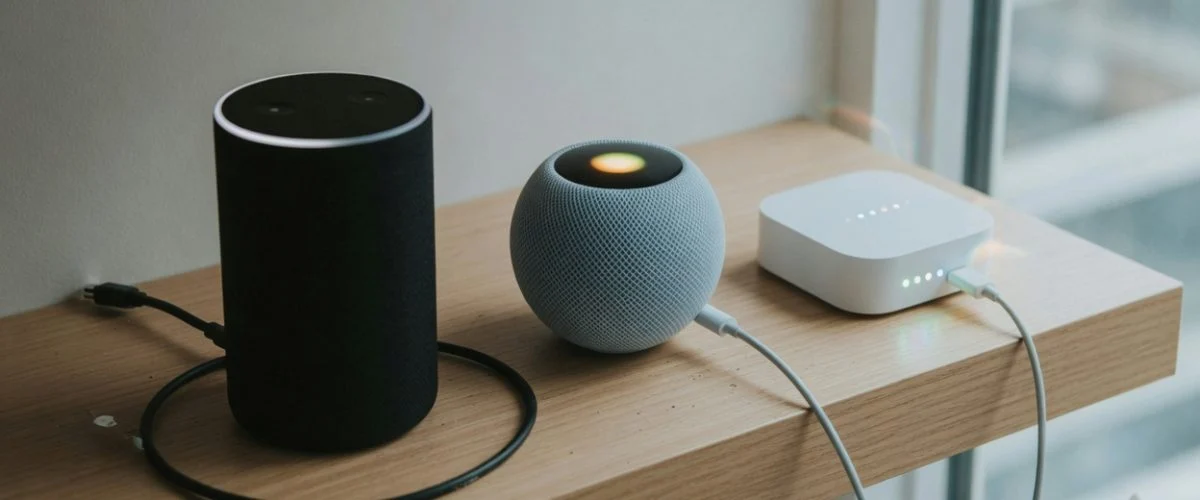

Your Echo isn’t a phone and your Hue Bridge isn’t a laptop. But the lithium-ion cell sitting inside them is following the same chemistry rules as every other Li-ion battery on Earth. And if you treat it the way you treat your phone — leaving it plugged in 24/7 at 100% in a warm media cabinet — you’re going to be replacing it, or the whole device, sooner than you think.
Why smart home hubs are a battery category of their own
Most of the electronics in your home fit one of two patterns: either they run on a battery you charge and discharge (phones, laptops, earbuds), or they live permanently plugged into the wall (TVs, routers, fridges). Smart home hardware blurs that line in a unique way.
Take a typical setup: an Amazon Echo or Apple HomePod on the kitchen counter is permanently tethered to its wall wart, but its internal Li-ion cell sits at ~100% SoC for years. A smart home hub like a SmartThings Hub, Hue Bridge, or Echo Show is similar — mains-powered but battery-backed so it survives short outages and the cell quietly absorbs calendar aging at full charge. Then there are the dozens of small wireless sensors that talk to those hubs: door/window contacts, motion detectors, leak sensors, wireless thermostats — many of which run on coin cells or a pair of AAA batteries that the system trickle-charges or expects you to replace.
The result is a population of cells that face three battery-hostile conditions simultaneously:
- Heat. Hubs live on shelves, in entertainment centers, in closets where AV gear runs warm. Sensors live above doorframes in direct sun. The temperature inside a closed media cabinet running a cable box, router, and Echo can easily hit 35–45 °C — the upper end of Li-ion’s safe range and the start of accelerated degradation.
- Sustained high state-of-charge. A wall-powered hub sits at 100% most of its life. Li-ion ages fastest at high SoC; storing at 100% at 25 °C for a year can cost 4–6% of capacity, and at 40 °C that loss can double or triple.
- Trickle or no-charge management. Cheap sensors use unregulated trickle circuits that hold NiMH cells at 100% for months, accelerating the bulging and leakage you’ll see below.
The good news: because these devices are rarely deeply discharged, they’re never asked to deliver high current. So their batteries age slowly if you keep them cool and out of a full-charge state. The bad news: most people set them up, stick them on a shelf, and forget them — so the cells quietly lose 20–40% of their capacity over three to four years until one day the device shows up as “offline” in the app.
Three kinds of batteries hiding in your smart home
Different smart-home devices use different chemistries, and each has its own failure mode. Knowing which is which is the first step to keeping them healthy.
| Battery type | Typical devices | What kills it | How to extend it |
|---|---|---|---|
| Li-ion / Li-poly (built-in, non-replaceable) | Echo (all gens), HomePod / HomePod mini, Echo Show, Nest Hub, SmartThings Hub v3, Hue Bridge v2 | Calendar aging at high SoC; sustained heat above 35 °C; rarely, swelling from overcharge | Keep it cool & ventilated; use a hardware charge limiter capped at ~80%; avoid enclosed warm cabinets |
| Coin cell (CR2032, CR2450, CR2) | Wireless thermostats (some Honeywell, ecobee remote sensors), door/window sensors, water leak sensors, key fobs, some smoke alarms | Self-discharge over 2–5 years; contact corrosion from leaking electrolyte; heat accelerates discharge | Use name-brand cells (Energizer/Panasonic/Renata); avoid dollar-store cells; replace on a 2-year schedule, not when they die |
| AAA / AA NiMH (rechargeable, sometimes user-replaceable) | Some door sensors, certain motion detectors, rechargeable remote controls, some smart locks | Bulging from overcharge; leakage onto PCB; high self-discharge (~1–3%/day at room temp vs 1–2%/month for Li-ion) | Use low-self-discharge NiMH (Energizer Recharge, Panasonic Eneloop); if device offers a non-rechargeable setting, switch it |
The always-plugged trap: why your hub’s cell is silently dying
An Echo, HomePod, or Hue Bridge spends essentially its entire life at 100% state of charge. The BMS (battery management system) inside stops charging once the cell hits its target voltage, but the cell never gets the chance to drop below ~95–99% — there’s no “rest” period. And calendar aging doesn’t need active charging to happen; it just needs time and a high SoC.
The published data on Li-ion calendar aging is consistent: a cell stored at 100% SoC and 25 °C loses roughly 4–6% of its capacity per year. At 40 °C that doubles. At 60 °C you can lose 20%+ per year. This is exactly the same chemistry that powers your phone, and it’s the reason Apple, Samsung, and Google all build “Optimized Battery Charging” features that hold the cell around 80% until you need it — see our deep-dive on why charging to 80% extends battery life for the underlying chemistry. The catch: those features are phone-side software tricks, and most smart-home hubs don’t have an equivalent. The cell just sits at 100% forever.
There’s one more thing that’s easy to miss: a hub’s cell only matters when mains power fails. If your home has reliable power and the hub never actually runs on battery, the cell is aging for nothing. If your power is patchy and the hub drops to battery often, the cell is also being cycled — and deep cycles wear it out faster than calendar aging at high SoC would. Either way, the cell is on a clock. The clock is faster in a warm cabinet.
The simplest mitigation is environmental: move the hub out of an enclosed AV cabinet, off a sunny shelf, and into a spot with airflow. If you can’t move it, a small USB fan aimed at the cabinet can drop internal temperatures by 5–10 °C, which roughly halves the calendar-aging rate. For devices where you have physical access to the USB-C power input, you can also use a hardware charge limiter like the Chargie to cap the input voltage at ~80% equivalent — the hub’s BMS will see “not quite full” and stop there. (Not every hub supports this — see the FAQ — but the ones that draw power over a standard USB port typically do.)
Coin cells: why your sensors silently die at 3 a.m.
The single most common smart-home failure isn’t the hub — it’s the dozens of tiny wireless sensors that depend on a coin cell. Door/window sensors, water leak detectors, motion sensors, key fobs, and some wireless thermostats all run on CR2032 (3 V lithium manganese dioxide) or similar coin cells, and they have a frustratingly predictable failure pattern.
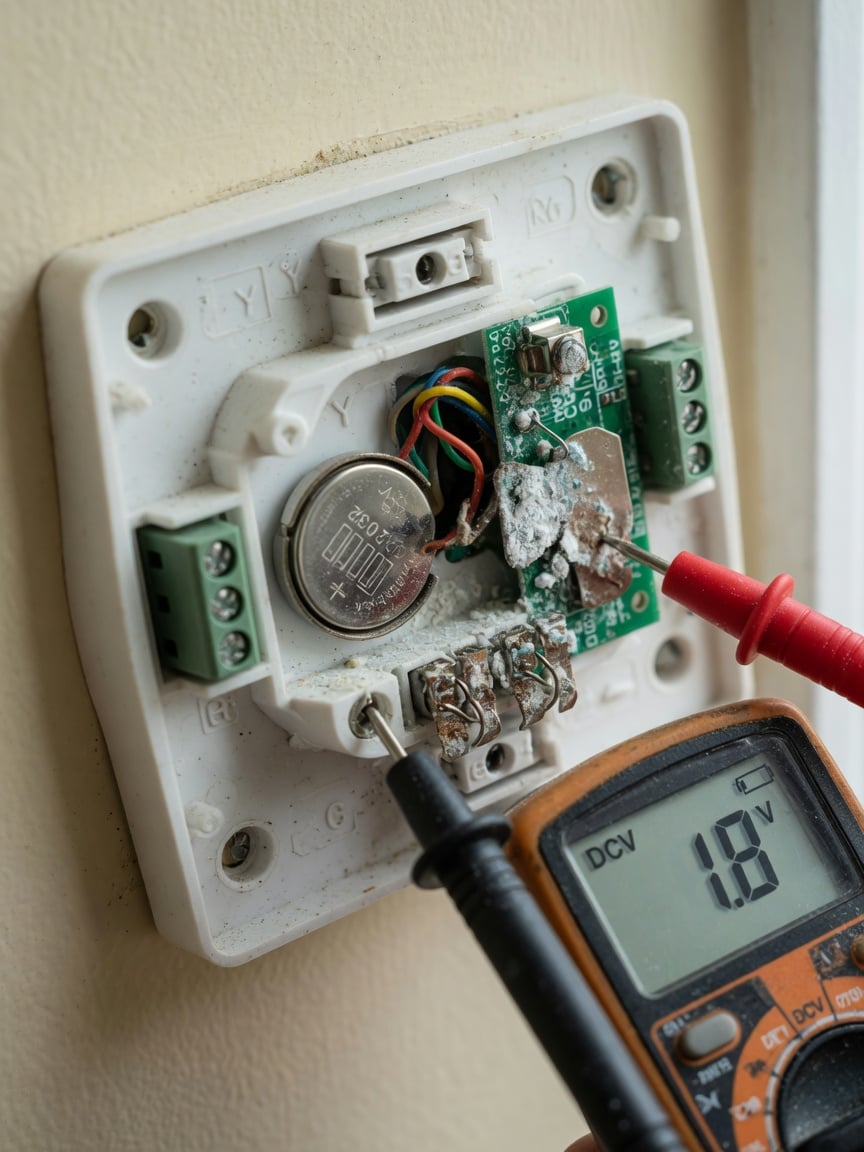
A fresh CR2032 has roughly 220 mAh at room temperature. In a typical door/window sensor that wakes up to report its state every few minutes and triggers a handful of times a day, that translates to about 2–3 years of life. In a leak sensor that wakes only when water touches the probes, you can get 5+ years. In a thermostat sitting in direct sun on a south-facing wall, you might get 18 months because heat accelerates the cell’s self-discharge. Panasonic’s own CR2032 datasheet shows the capacity drop accelerating sharply above 40 °C — exactly where many thermostats live.
But here’s the thing most people don’t know: coin cells rarely fail by “going dead” cleanly. They fail by leaking. The lithium salt electrolyte inside slowly diffuses to the seal, reacts with moisture in the air, and over months forms a white, crusty, mildly corrosive residue on the contacts. By the time the sensor stops reporting, the contacts are often too corroded for a fresh battery to make a reliable connection. You have to clean the contacts with isopropyl alcohol and a fiberglass pen (or a soft eraser in a pinch) before the new battery will work.
Three habits will keep your coin-cell sensors alive much longer:
- Use name-brand cells. Energizer, Panasonic, Duracell, Renata. The dollar-store 40-pack has higher internal leakage rates and shorter real-world life — sometimes by half.
- Avoid extreme heat. A door sensor on a south-facing window frame in summer can hit 50 °C. Move it to the side jamb or shade it. The same sensor on a north-facing wall can last twice as long.
- Replace on a schedule, not on a failure. Mark them with the install date (a tiny sticker works) and swap them every 2 years for high-traffic sensors, every 3–4 years for low-traffic ones. You’ll never have a sensor die at 3 a.m. and not know about it for 6 hours.
The NiMH trap: why your rechargeable sensors swell and leak
A handful of smart-home devices — most commonly rechargeable door/window sensors and certain smart locks — use a pair of AAA or AA NiMH cells, charged in-circuit by the device itself. This is where the most dramatic failures happen, because NiMH in a poorly-designed charging circuit will absolutely swell, vent, and leak.
The chemistry is unforgiving. NiMH cells tolerate trickle charging only at very low rates — Panasonic’s own NiMH charging manual warns that overcharging for long enough can damage a cell and recommends a C/10 (10-hour) charge rate as the maximum safe sustained rate. Cheap consumer electronics routinely exceed that with their “always topped up” maintenance mode, especially in devices that were designed to be plugged in for months at a time but ship with cells that aren’t designed for that duty cycle. The result: gas builds up inside the cell, the pressure vent opens, and you get white crystalline residue on the battery contacts and, worse, on the device’s PCB.
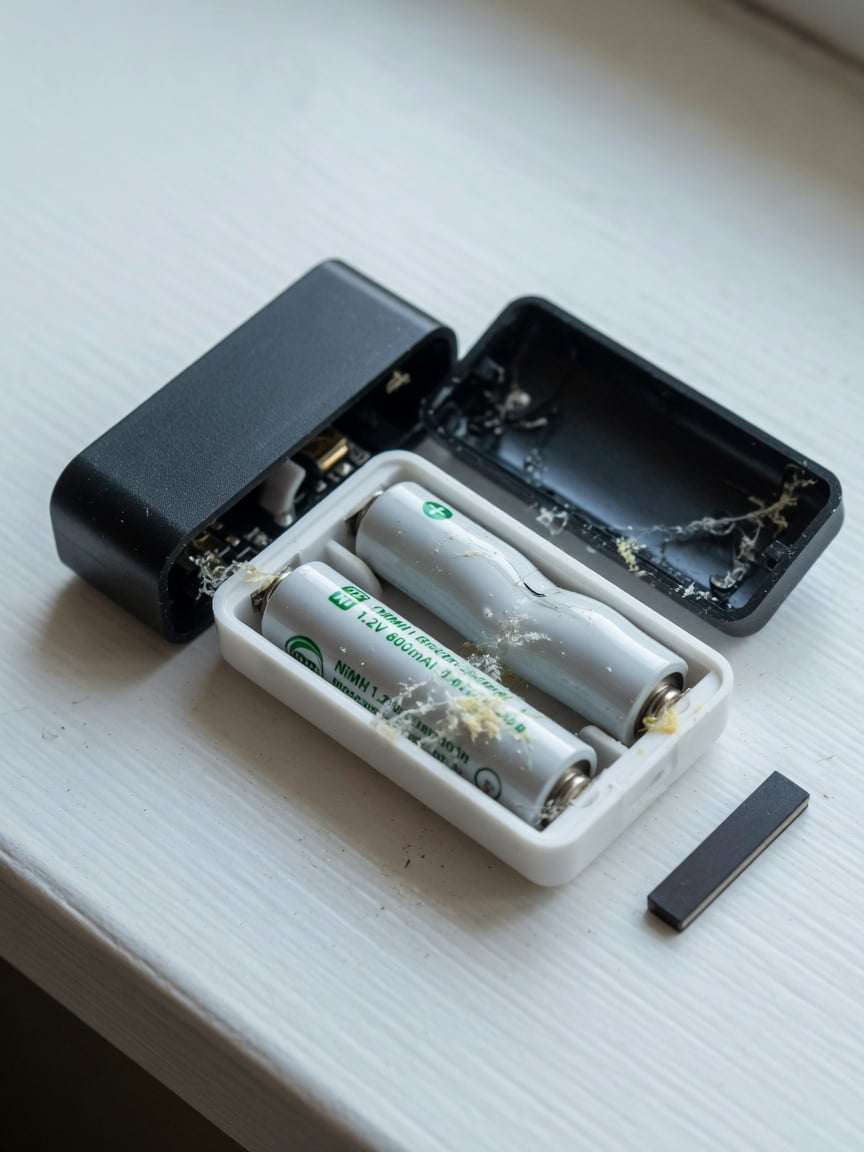
If you’ve opened a rechargeable smart-home sensor and found bulging batteries with a white crust, that’s what happened. The fix is usually straightforward — replace with low-self-discharge NiMH (Energizer Recharge Universal, Panasonic Eneloop Pro, or Amazon Basics rechargeable are all solid), clean the contacts with isopropyl alcohol, and check whether the device has a setting to disable in-device charging. If it does, set it to “use disposable batteries” mode and just swap alkalines every 6–12 months. Alkalines leak too, but they’re much more predictable about when they leak — and name-brand alkalines can sit in a device for a decade without incident.
When to replace (and when to just let it die)
Unlike phones and laptops — where a failing battery is a real fire risk and you should replace the battery or stop using the device immediately — smart-home batteries tend to fail gracefully. The most common failure mode is “the device shows offline in the app.” That’s annoying, but it’s not dangerous. A swollen Li-ion cell, on the other hand, is a real risk and should be removed as soon as you spot it; we cover the warning signs in our battery swelling guide.
A practical replacement schedule looks like this:
- Hubs with built-in Li-ion: Don’t replace proactively. Move them to a cool, ventilated spot. If the device starts swelling, dropping from the network during brief outages, or losing more than an hour of battery runtime during a power cut, the cell is at end-of-life — replace the whole device if the battery isn’t user-serviceable.
- Coin-cell sensors: Replace the cell every 2 years (high-traffic) or 3–4 years (low-traffic). Clean the contacts every time. Use name-brand cells.
- Rechargeable NiMH sensors: Inspect every 12 months for bulging or residue. Replace cells with low-self-discharge NiMH every 2–3 years. If the device supports disposable batteries, switch to that mode and skip the rechargeable failure mode entirely.
For the always-plugged hubs, the bigger lever isn’t replacement — it’s preventing degradation in the first place. Move the hub somewhere cool, give it airflow, and (if it’s USB-powered) consider capping the input with a hardware charge limiter so the cell sits at ~80% instead of 100%. You’ll extend the cell’s useful life from ~3 years to ~6–8 years in most cases, and you’ll never have to open the device or replace a sealed cell.
FAQ — smart home hub battery questions, answered
Should I unplug my Echo when I go on vacation to save the battery?
No — and yes. Unplugging for a week or two doesn’t meaningfully extend the cell’s life; the calendar aging is dominated by the rest of its life at 100%. What actually helps is keeping it cool and (if possible) capping the charge. Unplugging for a multi-month vacation or a move can help if the alternative is leaving it in a hot storage unit, but for a normal week-long trip, leave it plugged in.
Can I use a hardware charge limiter like Chargie with a smart-home hub?
Sometimes. If the hub draws power over a standard USB port (Echo Dot, HomePod mini via USB-C, many newer hubs) and the hub doesn’t require the full USB-PD negotiation to function, a hardware limiter that caps the input voltage will work and the hub’s BMS will hold the cell at a lower SoC. If the hub uses a proprietary barrel-jack power supply and won’t run at reduced input, the limiter won’t help. We’ve got a deeper write-up on why software charge limits aren’t always enough that explains the underlying physics.
Why does my door sensor’s battery last 6 months when the package says 2 years?
Almost always one of three things: heat (south-facing door in summer sun), distance from the hub (the radio has to crank its transmit power), or a dying cell in the batch (cheap cells vary widely). Move it to the side jamb, pair it closer to the hub, and try a name-brand cell — any one of those can double its real-world life.
My sensor’s contacts are white and crusty — is it safe to clean and reuse?
Yes, but carefully. The residue is mildly alkaline electrolyte — wash your hands after handling it. Clean the contacts with 90%+ isopropyl alcohol and a soft brush or a fiberglass scratch pen (sold for electronics repair), let it dry fully, install a fresh name-brand cell, and re-pair the device. If the PCB traces under the residue are visibly corroded (green or dark discoloration spreading away from the contact), the device is probably done — the corrosion is hard to stop once it gets under the solder mask.
Does the new Alexa+ (2025) change anything about Echo battery life?
Generationally, the Echo hardware hasn’t changed materially since the 4th-gen and Echo Dot 5th-gen in 2020–2022, and Alexa+ is mostly a software/service change that runs on the existing hardware. What can change is the always-listening power draw: a more active on-device assistant could marginally increase heat and quiescent draw, both of which accelerate battery aging slightly. In practice, the bigger Alexa+ effect is on your network and your hub traffic — your sensors will ping the hub more often, which shortens their battery life, not the Echo’s.
Should I buy a hub with replaceable batteries?
If you can find one. Most modern hubs have sealed Li-ion cells precisely because users complained about earlier generations losing contact with coin cells or having to open the case every two years. The trade-off is environmental: a sealed cell means the whole hub goes to e-waste when the cell fails. If longevity matters to you, look at the Home Assistant route (running open-source hub software on a mini-PC or Raspberry Pi you already own) — there’s no battery to fail, and you can swap the host hardware in 5 years without touching your sensors.
The bottom line
Smart-home batteries fail for the same reason all Li-ion, NiMH, and coin-cell batteries fail: heat, sustained high state-of-charge, trickle overcharge, and time. The hub on your counter, the sensor above your door, and the thermostat on your wall are all on a clock. You can’t stop the clock, but you can slow it down — with cooler placement, name-brand cells, scheduled replacement, and (where you have the option) a hardware charge limiter that keeps the always-plugged cells out of the high-SoC danger zone. Our guide to summer heat battery protection covers the environmental half of this in more detail if you’re setting up new hardware in a hot room.
Do those four things and your smart-home gear will outlast every other piece of consumer electronics in your house. Skip them, and you’ll be the person standing on a chair at 11 p.m. trying to figure out why the leak sensor under the sink is offline.

USB-C charge limiter that stops at your set battery level, so your battery never sits at 100% overnight. Extends battery lifespan by years. Works with any USB-C charger.

Limit your laptop charge to 80% via USB-C. Works with MacBooks, Dell, HP, Lenovo and most USB-C laptops up to 100W.
Protect Your Battery with Chargie
The world's first hardware charge limiter. Set a charge limit on any phone, tablet, or laptop — extend battery life by up to 4x.



