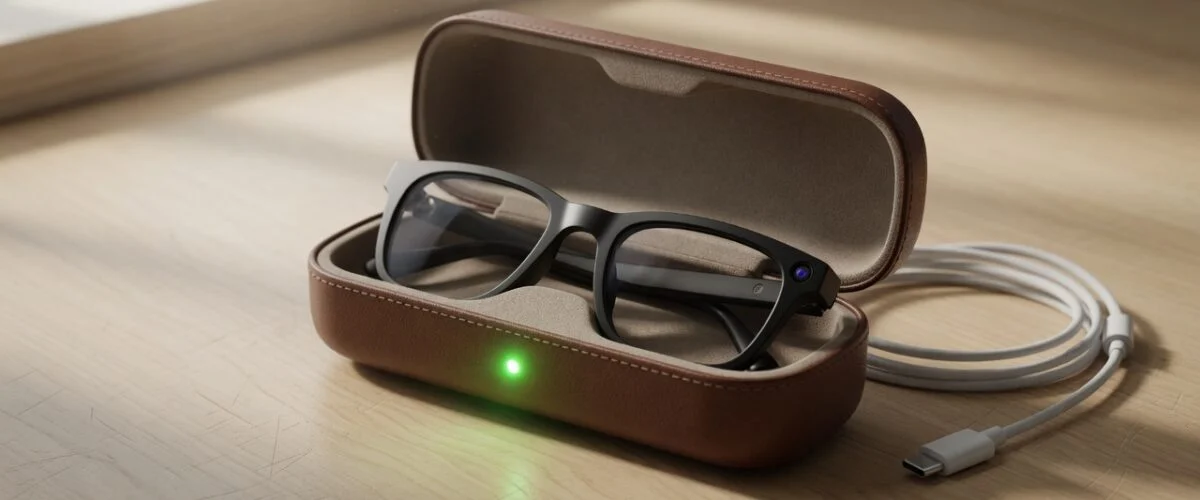

TL;DR: Smart glasses such as Ray-Ban Meta pack a very small lithium battery into the frame, and the only way to charge it is by docking the glasses in their case. That makes the case your battery-health control point. Keep the case out of heat, keep the nose-bridge contacts clean, avoid running the glasses flat every day, use battery saver when you need longer sessions, and don’t leave the case sitting on a charger at 100% around the clock. For storage, park them part-charged somewhere cool.
Smart glasses have quietly become a mainstream gadget. You take calls, listen to music, shoot hands-free video and talk to an AI assistant, all from a pair of sunglasses. But the battery that makes this possible is tiny, it sits a few centimetres from your face, and it lives a hard life: sun, sweat, pockets, car dashboards and a charging case that is plugged in more often than not.
This guide focuses on smart glasses battery health: what actually wears the battery out, how charging works on Ray-Ban Meta glasses, what Meta’s battery saver mode does, and which everyday habits protect the battery so your glasses still last through the afternoon a year or two from now.
Why smart glasses batteries are a special case
Phones, laptops and even smartwatches have room for a reasonably sized cell. Glasses don’t. The electronics, speakers, microphones and a camera all have to fit inside the temples and frame of something that still looks like normal eyewear. The result is a battery measured in hours of use rather than days.
The published numbers show how tight the budget is. A review of the Ray-Ban Meta glasses by EverythingUSB put a fully charged pair at up to about four hours of use, with the charging case reported to hold up to 32 hours of extra power. Meta’s own help center lists the newer Meta Ray-Ban Display glasses at up to 6 hours of mixed use per charge, with the folding case adding up to 24 hours. Earlier attempts at camera glasses were far more limited: the same EverythingUSB article notes that Snap’s Spectacles managed only about 45 minutes per charge, up from 30 minutes on an earlier model.
When a battery is that small, every percentage point of lost capacity is felt quickly. A phone that loses 15% of its capacity still gets you through most days. Glasses that lose 15% might stop lasting through a long walk or a commute plus lunch. That is why it is worth looking after this battery from day one, in the same way you would for wireless earbuds, which have a very similar case-based charging design.
How Ray-Ban Meta glasses actually charge
According to Meta’s help article on charging AI glasses, the glasses charge only one way: you place them in the charging case so that the nose bridge sits on the case’s charging connection. Meta states plainly that this is the only way to charge the glasses. The case itself is then charged with a USB-C cable plugged into its bottom.
A few details from Meta’s guidance are worth knowing:
- First charge: a protective plastic tab covers the metal charging connections in the case and must be removed before the first charge.
- Cable: USB-C to USB-C or USB-C to USB-A, rated for at least 1.2 A. Lower-rated cables still work, just more slowly.
- Adapter: USB-C or USB-A adapters of 5 W or more. USB Power Delivery is not required, and lower-wattage adapters are likely to work but charge more slowly.
- Two batteries: the glasses and the case each have their own battery, and both need charging.
The case LED tells you what is happening. Meta documents the meanings like this:
| Situation | Case LED | What it means (per Meta) |
|---|---|---|
| Glasses docked | Green solid | Glasses fully charged |
| Glasses docked | Orange solid | Glasses charging |
| Glasses docked | Red blinking | Charging error |
| Case empty | Green solid | Case fully charged |
| Case empty | Orange solid | Case not fully charged |
| Case empty | Orange blinking | Case battery low |
| Case empty | Red blinking | Charging error |
You can also see the charge level of the glasses, and of the case when the glasses are docked, in the Meta AI mobile app.
The important takeaway for battery health is structural: because the glasses can only charge inside the case, the case decides when and how the glasses get topped up. Every time you drop the glasses in, they start charging back toward full. If the case is hot, dirty or permanently on a charger, the glasses battery lives in those conditions too.
What wears out a smart glasses battery
Smart glasses use lithium-based cells, and lithium batteries age for the same reasons regardless of the device. Battery University’s guide BU-808, How to Prolong Lithium-based Batteries, sums up the main stresses: heat, time spent at a high charge voltage, and deep discharges.
Heat
BU-808 treats a battery dwelling above 30°C (86°F) as being at elevated temperature, and its storage table shows how much heat costs. The table below reproduces Battery University’s estimates for recoverable capacity after storage:
| Storage temperature | Stored at 40% charge | Stored at 100% charge |
|---|---|---|
| 0°C | 98% after 1 year | 94% after 1 year |
| 25°C | 96% after 1 year | 80% after 1 year |
| 40°C | 85% after 1 year | 65% after 1 year |
| 60°C | 75% after 1 year | 60% after 3 months |
Source: Battery University BU-808, Table 3 (estimates for cobalt-based Li-ion).
Sunglasses are, by definition, used in the sun. They get left on car dashboards, beach towels and café tables in direct light. The case often ends up in a hot bag or glovebox. Meta’s own troubleshooting confirms that heat matters: one of the listed reasons for a red blinking charging error is that the case has become too hot to charge the glasses, and the fix is to move the case somewhere cooler. For more on how summer temperatures affect lithium batteries, see our summer heat battery protection guide.

Sitting at 100% for long periods
The second stress is time spent fully charged. BU-808 notes that for most Li-ion cells a voltage above 4.10 V per cell counts as high voltage, and that exposing a battery to high temperature while it dwells at full charge for a long time can be more stressful than cycling it. Its charge-voltage table shows the trade-off: a cell charged to 4.20 V is estimated at 300–500 discharge cycles, while one charged to 4.06 V is estimated at 600–1,000 cycles, at about 81% of the stored energy. We explain the chemistry in more detail in why charging to 80% extends battery life.
Smart glasses make full-charge dwell very easy. Many people treat the case as the glasses’ home: take them off, drop them in, close the lid. If the case is also plugged in on a desk or nightstand, the glasses top up to 100% and then sit there for hours, often in a warm room.
Running the battery flat
The third stress is deep discharge. BU-808’s depth-of-discharge table estimates that an NMC cell delivers around 300 cycles when fully discharged each time, compared with around 1,000 cycles at 40% depth of discharge. Battery University also notes that partial discharges are fine for Li-ion: there is no memory effect, and the battery does not need periodic full discharges.
With a four- to six-hour battery, it is easy to run glasses down to zero during a day out recording video. Doing that occasionally is fine. Doing it every day adds wear.
Battery saver mode: what it really does
Meta added a battery saver mode for its AI glasses. According to Meta’s help center, it is available on all Ray-Ban Meta glasses as well as the Oakley HSTN and Oakley Vanguard models, and it is controlled from the Meta AI app on iOS and Android.
Meta says battery saver can increase battery life by up to 47% (approximately 1.5 additional hours) if you switch it on at 20% battery, or by up to 88% (approximately 7.9 additional hours) if you enable it at full charge. It gets there by pausing high-drain background features:
- “Hey Meta” voice activation is paused; you use the touchpad instead.
- Automatic volume adjustment is turned off.
- Automatic transfer of photos and videos is paused until battery saver is off.
- Maximum video length drops from 3 minutes to 1 minute.
- Video is set to 1080p at 30 fps.
You can still take calls, listen to music, take photos and short videos, and use Meta AI by tapping and holding the touchpad. Battery saver can also turn on automatically when the glasses drop to 20% while not charging, and it turns itself off once charging takes the glasses back to 75% or above.
From a battery-health point of view, battery saver is useful for one specific reason: it reduces how often you run the glasses flat. If you know you have a long day ahead, switching it on early is better than draining the battery to zero and then fast-topping it back up in the case.
Keep the nose-bridge contacts clean
Charging relies on metal contacts on the nose bridge of the glasses meeting the connection inside the case. Meta lists several reasons for a red blinking charging error, including liquid detected at the charging interface, a case that is too hot, and an incompatible cable or adapter. It also says that dried sweat, dirt and liquid can all interfere with the connection between the nose bridge and the case, which can stop the glasses charging and even powering on.

This matters for battery health more than it seems. If the glasses don’t make proper contact, you may put them in the case thinking they are charging, take them out hours later still nearly empty, and end up running them to zero again. A quick wipe of both the nose bridge and the case contacts after a sweaty day, then checking that the LED shows the glasses are charging, avoids that cycle.
Daily habits that protect smart glasses battery health
You don’t need a complicated routine. These habits cover most of the benefit:
- Keep the glasses and the case out of heat. Don’t leave them on a dashboard, in a glovebox in summer, or charging in direct sunlight. If the case feels warm, let it cool before charging.
- Top up rather than drain. Short, frequent top-ups are kinder to Li-ion than running to zero every day. Battery saver helps you avoid hitting empty on long days.
- Don’t leave the case plugged in permanently. Charge the case, then unplug it. A case that lives on a charger keeps both batteries at full for hours.
- Use a sensible charger. Meta asks for only 5 W and a 1.2 A cable. There is no benefit to a powerful fast charger here.
- Keep the contacts clean so every docking session actually charges the glasses.
- Check the status occasionally in the Meta AI app so you notice early if run time is falling.
Where a USB charge limiter fits
Here’s the practical problem: the glasses only charge from the case, and most people charge the case by leaving it plugged into a USB adapter on a desk or bedside table. You can’t set a charge limit inside the glasses, and the case simply charges to full whenever it has power.
A USB charge limiter such as Chargie sits between the USB adapter and the cable and controls when power flows. Instead of the case sitting on wall power all night, you can cut the power after a set time or at a set point, so the case and the glasses inside it don’t spend the whole night being held at 100%. Because Meta’s case is happy with a plain 5 W supply and does not need USB Power Delivery, it is a straightforward device to put behind a limiter.
It is worth being clear about what this does and does not do. A limiter controls the power going into the case. It does not read the glasses’ internal charge level, and it cannot change how the case charges the glasses once they are docked. What it does is remove the habit that causes the most avoidable wear: leaving the whole system on a charger, full, for hours every day. For the broader options on other devices, see how to limit battery charge to 80%.
Storing smart glasses for weeks or months
Sunglasses are seasonal for many people, and smart glasses often get put away for the winter. BU-808’s storage table shows why the state you store them in matters: at 25°C a cell kept at 40% charge is estimated to keep 96% of its recoverable capacity after a year, versus 80% when kept at 100%.
For longer breaks:
- Leave the glasses and case partly charged rather than full or empty.
- Store them somewhere cool and dry, not in a hot attic, car or sunny windowsill.
- Don’t leave the case plugged in for the whole storage period.
- Check them every month or two and top up if the case shows a low battery.
If you notice the case or the frame looking deformed or swollen, stop charging and contact the manufacturer. Our guide to battery swelling causes and prevention explains why heat and high charge are behind most cases. If you also own a headset, many of the same principles apply in our VR headset battery health guide, and if you film a lot, our action camera battery guide covers similar video-heavy use.
FAQ: Smart glasses battery health
Charging questions
Can I charge Ray-Ban Meta glasses without the case?
No. Meta’s help center states that placing the glasses in the charging case, with the nose bridge on the charging connection, is the only way to charge them. Keep the case with you if you expect a long day.
Do I need a fast charger for the case?
No. Meta lists a 5 W or greater USB-C or USB-A adapter and a cable rated for at least 1.2 A, and says USB Power Delivery is not required. Lower-rated chargers usually still work, just more slowly.
Usage questions
Does battery saver mode damage the battery?
No. Battery saver only pauses high-drain features such as “Hey Meta” and automatic photo transfer, and limits video length and resolution. If anything, it helps battery health by making it less likely that you run the glasses completely flat.
Is it bad to run my smart glasses down to 0%?
Occasionally it’s fine. Doing it every day adds wear. Battery University estimates far more cycles from partial discharges than from full ones, and lithium batteries have no memory effect, so frequent top-ups are better than running to empty.
Care and storage questions
Why is my case blinking red?
Meta lists three common causes: liquid at the charging interface between the nose bridge and the case, a case that is too hot to charge, or an incompatible cable or power adapter. Wipe both sets of contacts clean, move the case somewhere cooler and try a different cable or adapter.
How should I store smart glasses over winter?
Part-charged, cool and dry, and not plugged in. Battery University’s storage estimates show that cells kept at around 40% charge in moderate temperatures lose far less capacity over a year than cells kept full. Check and top up every month or two.
Sources
- Meta Help Center: How to charge AI glasses
- Meta Help Center: How to use battery saver mode for Meta AI glasses
- Meta Help Center: Battery life on Meta Ray-Ban Display and Meta Neural Band
- EverythingUSB: Ray-Ban Meta Smart Glasses: Battery Life and How to Charge Them
- Battery University BU-808: How to Prolong Lithium-based Batteries

USB-C charge limiter that stops at your set battery level, so your battery never sits at 100% overnight. Extends battery lifespan by years. Works with any USB-C charger.

Limit your laptop charge to 80% via USB-C. Works with MacBooks, Dell, HP, Lenovo and most USB-C laptops up to 100W.
Protect Your Battery with Chargie
The world's first hardware charge limiter. Set a charge limit on any phone, tablet, or laptop — extend battery life by up to 4x.