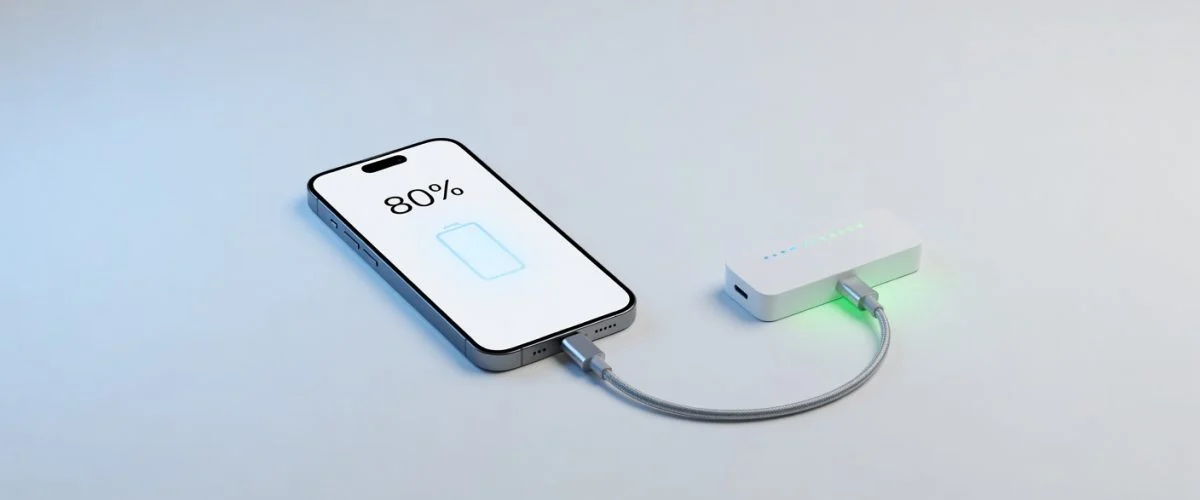

Every night, you plug in your phone before bed. By morning, it’s at 100%. Six months later, your battery health sits at 92%. A year after that, you’re hunting for a replacement or praying your warranty still covers the degraded cell.
We’ve all been there. And we’ve all heard the same advice: “Don’t let it charge to 100%.” “Unplug at 80%.” “Stop charging at 80%.”
Here’s the problem with that advice: It’s impossible to follow consistently.
You fall asleep. You’re busy. You forget. Apps fail, notifications get missed, and your phone happily gulps down electrons until it’s full. The 80% rule sounds simple in theory—but in practice, it requires a level of vigilance that nobody actually has.
That’s where hardware comes in. A USB charge limiter removes the human error from battery care entirely. No app needed. No manual intervention. Just plug in, and your phone stops at 80%—every single time.
Why 80% Is the Sweet Spot for Battery Health
Your phone uses a lithium-ion battery. Every charge cycle degrades it slightly. The closer you charge to 100%, the more stress you put on the cells. The voltage spikes when the battery is full, accelerating chemical wear on the anode and cathode.
Research from Battery University shows that lithium-ion batteries aged fastest when held at 100% charge. The sweet spot—the voltage range where chemical stress is minimized—is between 20% and 80%.
Apple recognized this with iOS 13’s Optimized Battery Charging, which learns your routine and slows charging to hit 80% by the time you wake. Google’s Pixel phones have similar features. But there’s a catch:
These software solutions only work when they detect your routine. Travel, irregular schedules, or simply forgetting to charge on your usual pattern—and the system defaults back to full speed, hitting 100% whether you like it or not.
The math is straightforward: keeping your battery between 20% and 80% can double its effective lifespan compared to charging to 100% every night. Two extra years from a single device? That’s a trade worth making.
Software Solutions vs Hardware: Why Apps Aren’t Enough
You’ve likely seen apps like AccuBattery or built-in phone settings that promise to limit charging to 80%. They work—to a degree. Here’s how they stack up against a dedicated hardware solution:
| Feature | Software (Apps) | Hardware (Charge Limiter) |
|---|---|---|
| Reliability | Depends on OS permissions, background execution | Physical circuit—no software dependency |
| Convenience | Requires setup, notifications, trust that it’s active | Set once, forget forever |
| Overnight charging | May delay but still reaches 100% | Stops definitively at 80% |
| Compatibility | Varies by phone model, Android version | Works with any USB-powered device |
| Cost | Usually free or low one-time fee | One-time purchase, no subscription |
The biggest issue isn’t feature availability—it’s trust. With software, you’re always wondering: “Is it actually limiting?” “Did the OS update disable it?” “Did my accidental airplane mode reset everything?”
Hardware doesn’t lie. When it says 80%, it’s 80%.
How a USB Charge Limiter Enforces the 80% Rule Automatically
A USB charge limiter sits between your phone and your charger. It monitors the power draw and voltage, and when the battery hits approximately 80%, it cuts the circuit—not by telling your phone to stop, but by physically reducing the voltage to a level where charging becomes inefficient.
This is fundamentally different from software throttling:
- The limiter operates independently of your phone’s operating system. No app permissions, no background processes, no OS update conflicts.
- Voltage-based cutoff means it’s precise. Your phone sees a steady charge until it crosses the threshold, then the taper begins.
- It works universally. USB-C, USB-A, Quick Charge, Power Delivery—it doesn’t matter. The limiter adapts to the connection.
For Chargie USB-C users, the experience is simple: plug your phone in, and the device automatically ramps down when hitting 80%. There’s nothing to configure, no app to install, no notification to dismiss.
Ready to protect your battery?
Real-World Results: How Much Longer Does Your Battery Last?
Let’s look at the numbers. A typical smartphone battery maintains useful capacity for roughly 500 full charge cycles before dropping below 80% of original capacity—the threshold most manufacturers consider “end of life.”
If you charge from 0% to 100% every day:
- 500 cycles ÷ 365 days = 1.37 years until significant degradation
If you charge from 20% to 80% (a 60% cycle) every day:
- The battery experiences less voltage stress per cycle
- Effective cycles extend significantly—some estimates suggest 2-3x the cycle life
- 500 cycles ÷ 365 days = potentially 4+ years of usable battery
A concrete scenario: Alex charges their Pixel 8 every night with Chargie set to 80%. After 18 months, Battery Health shows 98% capacity. Their colleague with the same phone, charging to 100% nightly, sits at 91%.
That’s not a fluke. It’s the physics of lithium-ion cells working in your favor—when you give them the chance.
Step-by-Step: Setting Up Your Chargie for 80% Charging
Setting up your Chargie USB-C device takes less than 60 seconds:
- Connect the limiter to your phone’s charging cable (the side that plugs into your phone).
- Plug the other end into your charger or power strip.
- Use your phone as normal. Chargie’s default setting targets approximately 80% capacity.
- Check the LED indicator—it shifts color or pulses when entering the taper zone.
That’s it. No app. No settings. No prompts.
To adjust the threshold (if your model supports presets), simply double-press the button to cycle between 80%, 90%, and passthrough modes. The limiter remembers your choice until you change it.
Common Mistakes People Make When Trying to Limit Charging
Mistake #1: Relying solely on built-in optimized charging
iOS Optimized Battery Charging and Android Adaptive Charging are excellent—until your schedule changes. A business trip, an emergency call at 2 AM, or simply inconsistent charging patterns disables the feature entirely. Software can’t override human unpredictability.
Mistake #2: Manually monitoring and unplugging
You will forget. You’ll be tired, distracted, or in a hurry. The moment you develop a habit of “five more minutes,” you’ve already defeated the purpose. Behavior-based solutions fail at scale.
Mistake #3: Using cheap third-party apps with excessive permissions
Many apps claiming to limit charging simply display a notification. Others require root access or drain more battery than they save. If the app closes or your phone restarts, protection disappears.
Mistake #4: Disabling fast charging entirely
Some users try to preserve battery by using old 5W chargers. While this generates less heat, it creates a new problem: chronic undercharging. A battery sitting at 40-50% most of the time suffers from a different (but equally damaging) pattern. Balance, not elimination, is the goal.
FAQ: Everything You Wanted to Know About 80% Charging
Q: Is 80% actually enough for daily use?
Yes. For most users, 80% comfortably covers a full day of moderate use. If you’re on your phone heavily—video calls, GPS, gaming—you might need to top up before evening. But the tradeoff in battery longevity is worth it.
Q: Does fast charging degrade battery faster?
Fast charging generates more heat, and heat accelerates degradation. However, this is primarily an issue when combined with full charges. Using a limiter with fast charging capabilities (and capping at 80%) gives you both speed and longevity.
Q: Can I use a hardware limiter with wireless charging?
Currently, most USB limiters work with wired connections. Wireless chargers have their own thermal considerations—some models include foreign object detection that may conflict with certain limiters. Check compatibility before your setup.
Q: What happens if I need to charge to 100% for a trip?
Most limiters offer a “passthrough” mode that disables the limit temporarily. Double-press the button, charge fully, then switch back. It’s one action when you need it—protection every other time.
Q: Will this void my phone warranty?
No. A device that draws power through USB is electrically identical to any other charger. It doesn’t modify your phone’s hardware or software, and it doesn’t violate any manufacturer’s warranty terms.
The Bottom Line
Limiting your phone to 80% is one of the most effective ways to extend battery lifespan. The challenge has never been the science—it’s the execution.
Apps are helpful reminders, but they’re not guarantees. You need a solution that works whether you’re paying attention or not. A hardware USB charge limiter provides that guarantee: plugin, forget, and trust that your battery is being treated the way it deserves.
Chargie gives you that guarantee. Don’t wait until your battery health drops to 85% to wish you’d started. Get the hardware that makes 80% charging effortless—and enjoy a phone that keeps its peak performance for years longer than the average device.
Related Products
- Chargie USB-C — Automatic 80% limiter with USB-C connectivity
- Chargie USB-A — Same hardware protection for older connectors

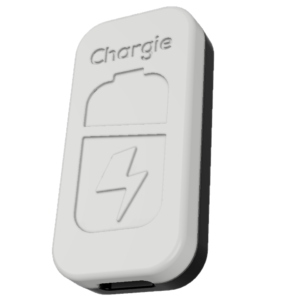
USB-C charge limiter that stops at your set battery level. Prevents overnight overcharging to extend battery lifespan by years. Works with any USB-C charger. (≈ $7 USD / €6 EUR)
Limit your laptop charge to 80% via USB-C. Works with MacBooks, Dell, HP, Lenovo and most USB-C laptops up to 100W. (≈ $11 USD / €10 EUR)
Protect Your Battery with Chargie
The world's first hardware charge limiter. Set a charge limit on any phone, tablet, or laptop — extend battery life by up to 4x.