

Your phone is working harder on July 4th than on almost any other day of the year. Between the heat, the GPS you keep open to navigate to the barbecue, the hundreds of photos and videos you’ll take, the streaming music by the pool, and the marathon group texts coordinating who’s bringing what — your battery is going to be sucking fumes by the time the fireworks actually start.
The good news: a few small habits, applied once, will keep your phone alive from sunrise sparklers to the last firework. Here’s a field-tested checklist you can run through in the five minutes before you head out the door.
Why your phone struggles on July 4th
Four things team up to kill your battery on the 4th:
- **Heat.** A sunny day at the parade, the beach, or the backyard can easily push ambient temperatures into the 90s°F (32°C+). Lithium-ion batteries degrade fastest above 95°F, and a hot phone also throttles charging and dimming behavior to protect itself — which means your battery looks and feels worse than it actually is.
- **Constant screen-on time.** Camera viewfinder, Maps, group chats, music controls, a flashlight at dusk. Your screen is the single biggest battery drain, and on a holiday it’s almost never off.
- **Cellular and GPS strain.** Crowded venues (a packed waterfront, a stadium, a big parade route) force your phone to work harder to hold a signal. Each ping uses more power than a quiet afternoon at home.
- **Streaming and sharing.** Live-location sharing with friends, photos uploading in the background, a Spotify playlist on Bluetooth — every convenience takes its cut.
None of this is a reason to stay off your phone. It’s just a reason to treat it the way you’d treat yourself on a hot day: hydrate early, stay in the shade, don’t run a marathon without a break.
6 tips to make your phone battery last through July 4th
1. Cap the charge at 80% the night before
This is the single highest-leverage habit for the long-term health of your battery, but it has a July 4th benefit too: if you charge to 100% overnight on July 3rd, your phone then sits at peak voltage for hours in the heat of your nightstand or charging cable. Capping at 80% before you go to sleep means your battery spends the least-stressful time in the safest voltage window, and you wake up with a phone that’s already in good shape.
A [hardware USB charge limiter](https://chargie.org/what-is-a-usb-charge-limiter/) like Chargie makes this automatic — it sits between your charger and your phone and physically stops the charge at 80% (or any percentage you set), every single night, no app required. So when July 4th starts, you’re already a step ahead.
2. Keep the phone out of direct sun and out of parked cars
This one is non-negotiable. A parked car in summer sun can hit 130–150°F (55–65°C) inside in under an hour. That temperature will permanently damage your battery — and in extreme cases, can cause swelling that’s a real safety hazard. Same goes for leaving your phone on a picnic table in the sun while you watch the parade.
A few easy rules:
- **In the car:** Phone goes in the glove box or under a seat, never on the dashboard.
- **At the parade or beach:** Buried in a backpack, under a towel, or in a shade pouch. Not in your back pocket.
- **While charging at home before you leave:** Off the windowsill, off the dashboard, on a nightstand in a cool room.
If your phone feels hot to the touch, it’s already losing capacity. Treat that as a signal to shade it.
3. Lower brightness, turn off live features you don’t need
You don’t need full brightness at an outdoor 4th of July event — you can’t see the screen well anyway in direct sun, and a polarized sunglass-arms-out squint beats full brightness any day.
Quick settings to flip before you leave the house:
- **Brightness:** Auto-brightness on, or manually drop it to about 40–50%.
- **Live activities / always-on display:** Off for the day.
- **Background app refresh:** Off (Settings → General → Background App Refresh on iPhone, or similar on Android).
- **5G:** If you’re in a crowded venue where 5G is patchy, switch to LTE — your phone spends less power hunting for a signal.
- **Wi-Fi calling & Bluetooth:** Off unless you’re actively using them.
None of this takes more than a minute, and the cumulative savings are huge. We’ve written a [full guide on summer heat and phone batteries](https://chargie.org/summer-heat-phone-battery-protection-guide/) if you want the deeper science.
4. Bring a small power bank — but charge it smart
A pocket-sized power bank is the difference between “I got the whole fireworks show on video” and “I missed the grand finale because my phone died at 9:47pm.” Bring one — but treat it well:
- **Pre-charge it to ~80% before you leave**, not 100%. Same reason as your phone: lithium-ion banks age fastest at peak voltage. Many quality power banks have a simple 80% mode in their app, or you can use a [hardware charge limiter](https://chargie.org/which-chargie/) on them the night before.
- **Don’t leave it in the hot car.** Power banks are lithium-ion too — they don’t like heat any more than your phone does.
- **Recharge it the same night, but not to 100%.** Topping to 80% the morning after means it’s ready for July 5th’s adventure, and the bank itself stays healthier for years.
A few extra tips on the topic are in our guide to [power bank battery health](https://chargie.org/power-bank-battery-health/).
5. Use Airplane Mode in genuinely crowded venues
If you’re at a packed concert, parade, or waterfront show, your phone will burn through battery trying to hold a weak cellular signal — often without you noticing. A few options:
- **At a parade or stadium:** Airplane Mode on, then turn Wi-Fi back on to post and message over the venue’s Wi-Fi (if available).
- **At a backyard BBQ with spotty signal:** Airplane Mode on, Wi-Fi on for the home network, and you’re set.
- **Group coordination:** Agree on a meeting spot and time before you go. The less your phone pings the cell towers looking for everyone, the longer it lasts.
You’ll be surprised how much battery you save in a 30-minute crowded stretch.
6. Don’t fast-charge a hot phone
If your phone is warm from being outside and you plug it into a fast charger, the phone will deliberately throttle the charge to protect itself — which means slow charging plus extra heat. Better options:
- **Let it cool first.** Move into shade or AC for 10–15 minutes before plugging in.
- **Use a slower charger.** A 5W or 10W brick charges more gently than a 30W+ fast charger, and the phone stays cooler.
- **Take the case off while charging.** Trapped heat is the enemy.
A quick pre-July-4th checklist
Five minutes before you walk out the door:
That’s it. Do this once, and your phone makes it from sunrise to the last firework.
How to make this automatic — not a yearly ritual
The most powerful habit in this entire list is also the one you should never have to think about again: capping the charge at 80% every night, on every device, all year long. That’s not a July 4th tip — it’s the single biggest lever for making your phone, tablet, and laptop batteries last for years instead of months.
A [hardware USB charge limiter from Chargie](https://chargie.org/which-chargie/) plugs in between your charger and your phone and stops the charge at the percentage you set. No app to forget. No alarm to set. No software update that quietly disables the feature. It works the same way on every device, every night, forever.
So this July 4th, enjoy the parade. Take the photos. Stream the playlist. Record the fireworks. And let a small piece of hardware take care of the battery you depend on — so it keeps showing up, year after year.
*Not sure which Chargie fits your phone, tablet, or laptop? [Take the 60-second quiz](https://chargie.org/which-chargie/) and we’ll match you to the right one in about a minute.*
Frequently asked questions
Does heat really damage phone batteries?
Yes — permanently. Lithium-ion batteries degrade fastest above about 95°F (35°C), and a hot car or a sunny picnic table can easily push your phone past that. Heat damage is cumulative and irreversible, so the shade habits matter more than any single charging choice.
Should I let my phone die completely on July 4th?
No. A full discharge to 0% stresses a lithium-ion battery more than a partial one. If you’re down to 5–10%, switch to airplane mode and get to a charger or a power bank. The goal is to keep the battery in the gentler 20–80% band as much as possible.
Is it OK to charge my phone in the sun?
Not really — the phone will throttle charging to protect itself from heat, and you’ll get a slow, warm charge. Move into shade, take the case off, and use a slower charger if you have one.
Can I take my power bank on a plane?
Yes, with rules. As of 2026, most airlines require power banks in carry-on only (not checked luggage), under 100Wh without airline approval, and some cap capacity at 27,000mAh or require airline-specific approval above that. We break it down in our guide to [2026 power bank airline rules](https://chargie.org/power-bank-airline-rules-2026/).
How do I keep my phone cool during a fireworks show?
Stand back from the crowds, keep the phone in a bag rather than your hand, and avoid running the camera for long unbroken stretches — extended 4K video recording generates significant heat. If the phone feels warm, give it a few minutes of shade before you start recording the finale.

USB-C charge limiter that stops at your set battery level, so your battery never sits at 100% overnight. Extends battery lifespan by years. Works with any USB-C charger.
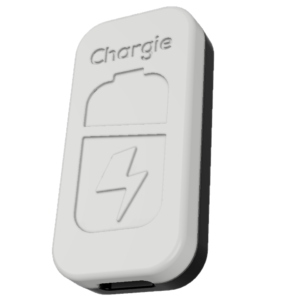
Limit your laptop charge to 80% via USB-C. Works with MacBooks, Dell, HP, Lenovo and most USB-C laptops up to 100W.
Protect Your Battery with Chargie
The world's first hardware charge limiter. Set a charge limit on any phone, tablet, or laptop — extend battery life by up to 4x.