


Why dash cam batteries have it worse than any other gadget
Every battery guide on this site talks about heat and full-charge float as the two things that age a lithium-ion cell fastest. A dash cam experiences both simultaneously, permanently, by design.
Unlike a phone that spends a night on the charger and the rest of the day discharging in your pocket, a hardwired dash cam is powered continuously whenever the car’s accessory circuit is live, and many parking-mode setups keep it drawing a trickle even with the engine off. That means the internal cell — if it has one — sits near 100% state of charge almost permanently, inside an enclosure with poor airflow, mounted against a windshield that acts like a magnifying glass for solar heat.
Add the temperature swings of a parked car — field studies have measured interior dashboard temperatures reaching 60-70°C (140-160°F) on a sunny day even when outside air is a comfortable 25°C (77°F) — and you have a textbook worst-case environment for lithium-ion chemistry.
Supercapacitor vs. lithium-ion: why manufacturers are switching
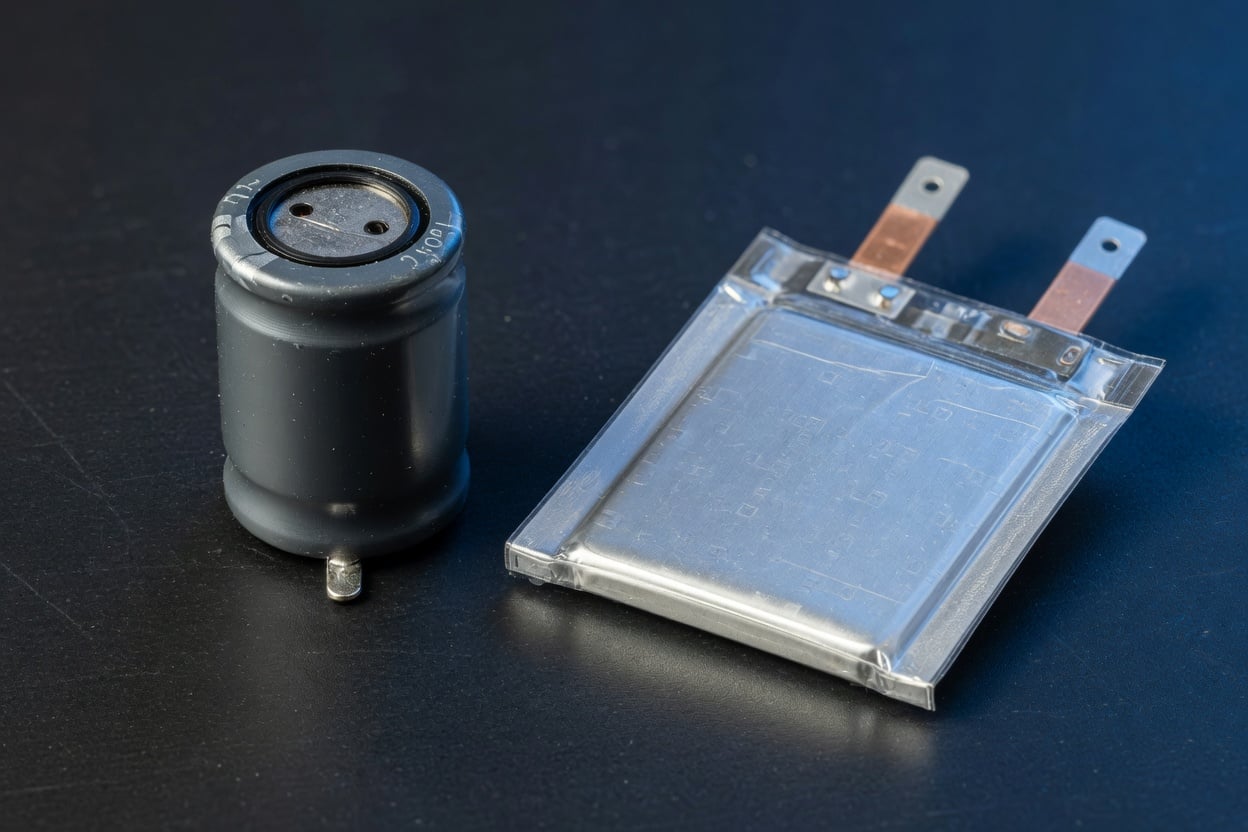
This is the single most important thing to understand if you’re shopping for a dash cam: the power source under the hood matters more than the megapixel count.
A supercapacitor is an entirely different energy-storage technology from a battery. As Wikipedia’s technical summary puts it, a supercapacitor “bridges the gap between electrolytic capacitors and rechargeable batteries,” typically storing far less energy per unit mass than a lithium-ion cell but able to “accept and deliver charge much faster than batteries” and “tolerate many more charge and discharge cycles than rechargeable batteries.” That charge/discharge cycle tolerance, plus a much wider safe operating temperature range, is exactly why dash cam makers reach for them.
The trade-off is capacity: a supercapacitor can only power the camera for a few seconds to a couple of minutes after the car’s power is cut — just long enough to safely save the current recording buffer. A lithium-ion cell, by contrast, can run true parking-mode recording for hours on its own stored energy. So the choice isn’t “better vs. worse,” it’s a different design goal: supercapacitors optimize for heat survival and longevity in a car; lithium-ion optimizes for standalone runtime.
Comparison table: dash cam power sources
| Factor | Lithium-ion battery | Supercapacitor |
|---|---|---|
| Safe operating temp (typical) | ~0-45°C charging, degrades above ~45°C | -40°C to 65-70°C |
| Cycle life | ~300-800 cycles before notable fade | 10,000+ cycles, largely heat-independent |
| Standalone parking-mode runtime | Hours (camera can record independently) | Seconds to ~2 minutes (buffer-save only) |
| Failure mode in heat | Swelling, capacity loss, rare thermal event | Gradual capacitance loss, no swelling risk |
| Best for | Cooler climates, cars often parked in shade/garage | Hot climates, dashboard-mounted, direct sun exposure |
| Typical price tier | Budget to mid-range | Mid-range to premium |
If your dash cam has a lithium-ion battery: the heat problem

Most budget and mid-range dash cams still use a small lithium-ion or lithium-polymer cell, and this is where our summer heat and battery protection guide applies directly. The chemistry doesn’t care that the device is a camera instead of a phone — elevated temperature accelerates the same internal degradation reactions. It’s worse for a dash cam, though, because you can’t move it out of the sun during the day the way you’d move a phone off a hot dashboard.
The most visible symptom is battery swelling — the same phenomenon we cover in our battery swelling causes and prevention guide. A swollen dash cam battery can crack the camera’s plastic housing from the inside, and in rare cases the pressure can damage the windshield mount. Manufacturers that ship lithium-ion dash cams increasingly add a “swelling-safe” design that lets the enclosure flex without breaking, but the safest fix is avoiding extreme heat exposure in the first place — or choosing a supercapacitor model.
Hardwired power: the same 100%-float problem as overnight phone charging
Beyond heat, a hardwired dash cam has a second problem familiar to anyone who’s read our guide on limiting battery charge to 80%: it spends nearly all its life sitting at a high state of charge, continuously topped off by the car’s accessory power the moment the engine is running. Unlike a phone you actively unplug once it hits 100%, a hardwired dash cam has no such interruption built in — the accessory circuit keeps delivering power for as long as the ignition (or an “always-on” wiring tap) is live — several hours a day, day after day, for years, for most commuters.
Lithium-ion cells age fastest when held at high voltage for extended periods — a phenomenon we’ve documented in depth in why charging to 80% extends battery life. A dash cam’s internal battery is essentially always floating at or near 100%, the exact stress state that most accelerates degradation. Combined with cabin heat, it’s a compounding problem: heat speeds up the chemical reactions that cause aging, and a full charge provides the high-voltage environment that makes those reactions more damaging.
This is the same mismatch we cover in our USB charge limiter explainer: any device that’s “always plugged in” — phones on a nightstand overnight, laptops docked at a desk, or a dash cam wired into a car — benefits from something that interrupts the float instead of letting the battery sit at maximum charge indefinitely.
Practical steps to extend your dash cam’s power source
- Check what power source it uses. Look up your model’s spec sheet for “supercapacitor” vs. “battery” — this single fact tells you how much heat tolerance you’re working with.
- Park in shade when you can. Every degree of cabin temperature reduction meaningfully slows lithium-ion degradation; this is the single highest-leverage habit for lithium-ion dash cams.
- Disable unnecessary parking-mode recording if you don’t need 24/7 surveillance — it reduces both heat generation from the camera’s own electronics and the duty cycle on the battery.
- Use a hardwire kit with low-voltage cutoff so the dash cam (and your car battery) aren’t drained by extended parking-mode recording in a hot, stationary car.
- Inspect for swelling every few months — a slightly bulging camera housing or a battery door that no longer sits flush is your early warning sign, per our swelling guide.
- Consider a supercapacitor model on your next purchase if you live somewhere with hot summers or regularly park in direct sun — it trades a few minutes of parking-mode runtime for years of reliability.
- Use a sunshade on the windshield when parking for extended periods in summer — reflective shades can significantly cut the greenhouse effect that pushes cabin temperatures into the 60-70°C range, protecting the dash cam along with everything else mounted near the glass.
- Angle the camera away from direct sun exposure where the lens design allows it — some mounts let you tilt the unit slightly to reduce how much direct sunlight hits the housing during peak afternoon hours.
None of these habits require replacing your dash cam or buying new hardware — they’re the same low-effort, high-payoff category of fix we recommend across every device on this site, because the physics of lithium-ion degradation doesn’t change based on what the battery is powering.
What about the phone you use to view dash cam footage?
Most dash cams pair with a phone app over Wi-Fi to review clips, which means your phone is doing extra charge-discharge cycling and heat exposure too — especially if you’re reviewing footage right after a hot drive, phone still warm from sitting on the dashboard. The same principles from our charge limiter guide apply: a hardware limiter on your phone’s charger prevents the 100%-float problem regardless of what’s draining or topping up your phone throughout the day.
The bottom line
A dash cam’s power source lives in the single harshest thermal and charging environment of any consumer gadget — permanently plugged in, permanently near full charge, and baking in direct sun for hours at a time. Lithium-ion dash cams need real heat management (shade, ventilation, swelling checks) to last; supercapacitor dash cams sidestep the problem almost entirely at the cost of standalone runtime. Either way, the underlying physics is the same one we cover across every device on this site: heat and high-state-of-charge float are what kill lithium-ion batteries, and the fix is managing both wherever you can.
FAQ
Do all dash cams have a battery?
No. Most modern mid-range and premium dash cams use a supercapacitor instead of a lithium-ion battery specifically because of the heat and continuous-power problem described above. Budget models are more likely to use a small lithium-ion or lithium-polymer cell.
Why do dash cam batteries swell?
The same reason any lithium-ion cell swells: internal gas buildup from electrolyte breakdown, accelerated by heat and prolonged high-state-of-charge storage. A dash cam experiences both stressors continuously, which is why swelling shows up faster than in devices that spend part of their day cooling off and discharging. See our full battery swelling guide for warning signs and safety steps.
Is a supercapacitor dash cam better than a lithium-ion one?
It depends on your priorities. Supercapacitors handle heat and duty cycling far better and effectively don’t wear out on the timescale a car does, but they only power the camera for seconds to a couple of minutes after the engine shuts off — enough to safely finish saving a recording, not for extended standalone parking-mode surveillance. Lithium-ion gives you hours of standalone runtime but degrades faster in heat.
How hot does it get inside a parked car?
Field measurements commonly show dashboard-area temperatures reaching 60-70°C (140-160°F) on a sunny day even when the outside air temperature is a mild 25°C (77°F) — well above the safe charging range for most lithium-ion cells, which typically starts to degrade meaningfully above ~45°C.
Can I replace a dash cam’s battery myself?
Some models support user-replaceable batteries; many premium ones with sealed, weather-resistant housings don’t. Check your specific model’s documentation before attempting it — a swollen lithium-ion cell should be handled carefully and disposed of at a battery recycling point, not opened or punctured.
Does parking mode drain my car’s battery?
It can, if the dash cam draws continuous power without a low-voltage cutoff. Most hardwire kits include a cutoff that disconnects the dash cam once the car battery drops below a safe threshold — check that yours has this feature enabled, especially if the car sits unused for days.
Does a charge limiter work with dash cams?
Hardware USB charge limiters like Chargie are designed for USB-charged devices like phones, tablets, and laptops rather than hardwired 12V dash cam installs. But the underlying lesson applies: any device that sits at a continuous high state of charge ages faster, so where you do have control — like the phone you use to review footage — using a limiter helps.

USB-C charge limiter that stops at your set battery level, so your battery never sits at 100% overnight. Extends battery lifespan by years. Works with any USB-C charger.

Limit your laptop charge to 80% via USB-C. Works with MacBooks, Dell, HP, Lenovo and most USB-C laptops up to 100W.
Protect Your Battery with Chargie
The world's first hardware charge limiter. Set a charge limit on any phone, tablet, or laptop — extend battery life by up to 4x.



