
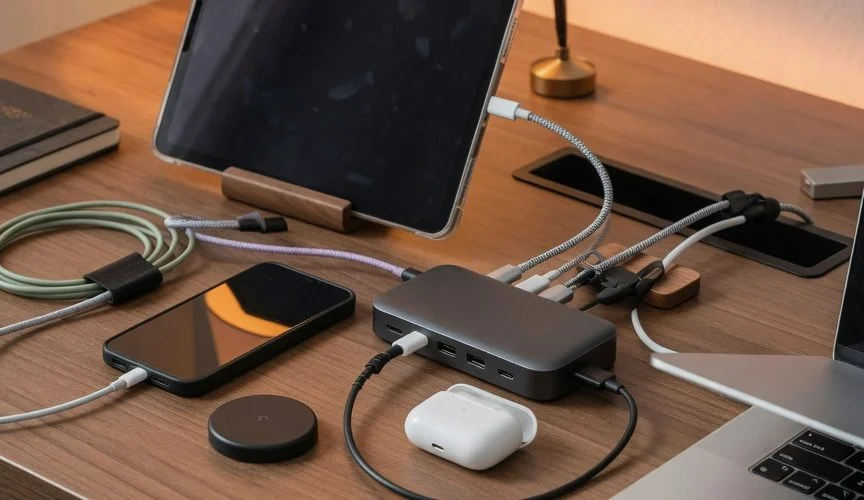

Your desk has a charging station. Six ports, 100W or more of total power, USB-C PD on every port. Your phone, your laptop, your earbuds, your tablet, your smartwatch, your backup phone — all plugged in, all sitting at 100% by 2 AM, all sitting at 100% until you wake up at 7. The station works exactly as advertised. It’s also aging every single battery on it.
The problem isn’t the charging station. A quality multi-port GaN station from Anker or UGREEN delivers clean, well-regulated power to each port. The problem is what happens after each device hits 100% — and nothing in the station does anything about that.
What Happens When a Battery Sits at 100%
When your phone reaches 100%, it doesn’t stop charging. It enters a trickle-charge loop: the battery drains slightly, the charger tops it back up, the battery drains slightly, the charger tops it back up. This happens repeatedly, all night, every night.
Each micro-cycle is small, but the cumulative effect is not. The battery spends hours per night at maximum voltage (4.2V per cell for most Li-ion chemistries), and the research is unambiguous about what that does:
Calendar aging accelerates sharply above ~80% state of charge. Battery University’s reference data (BU-808) is clear on the relationship: most Li-ion cells charge to 4.20V/cell, and every 0.10V reduction in peak charge voltage roughly doubles cycle life. A cell held at 4.20V delivers 300–500 cycles; at 4.10V, that extends to 600–1,000. The mechanism is SEI-layer growth and electrolyte oxidation — both voltage-driven, both permanent.
We break this down in detail in our science explainer on the 80% rule — the short version: every hour your battery spends above 80% costs you cycle life you don’t get back.
Now multiply that by six devices. Your desk setup is running this experiment on every battery you own, simultaneously, every night.
The Trickle-Charge Heat Problem
There’s a second issue that’s specific to multi-device stations: heat accumulation.
A 6-port charging station running at full load generates significant waste heat inside the brick. That heat radiates outward. If your phone is plugged in and sitting next to the station — or worse, sitting on top of it — it’s charging in a warmer ambient environment than you’d expect.
Battery University classifies anything above 30°C (86°F) as elevated temperature for Li-ion. At 40°C and 100% charge, a cell retains only 65% capacity after one year — versus 80% at 25°C. A phone that charges warm because it’s nestled against a hot charging station is aging faster for no functional benefit. And unlike the 100% problem, you can’t see this one — the phone isn’t hot to the touch, it’s just in a warm spot.
The fix is physical: give the station breathing room. Don’t stack devices on or against it. If it has active cooling (fans, vents), don’t block them. If it’s a passive metal-shell design, the metal is the heatsink — keep it on a hard surface, not on a mousepad or inside a drawer.
Why Your Built-in Charge Limit Isn’t Enough
If you have an iPhone 15+ with the 80% hard limit, or a Samsung with Protect Battery at 85%, you’re partially covered — for that one device. But a multi-device station serves everything: your iPad (no user-settable charge limit), your earbuds (no charge limit at all), your laptop (maybe has one, maybe doesn’t), your kid’s phone, your backup phone.
Software charge limits are device-specific, inconsistent, and easy to lose. They don’t follow the device to a new charger, they don’t cover older hardware, and they’re trivially disabled by an OS update or a factory reset. A 6-port station with two phones that have built-in limits and four devices that don’t is still aging four batteries every night.
How to Set Up a Battery-Healthy Charging Station
Here’s what a desk setup looks like when it’s actually protecting your batteries:
The station: A quality GaN multi-port charger from a reputable brand. Size the total wattage with headroom above the sum of your devices’ max power draws — headroom means the station runs cooler and each port gets full power. UL or ETL certified. Not the cheapest one on the marketplace.
Placement: On a hard, open surface. Not in a drawer, not under a monitor stand with no airflow, not sandwiched between books. The station needs to shed heat; let it.
Charge limiting: This is the part most desk setups miss. Every device on the station should stop charging at 80%. For phones and tablets, a hardware USB charge limiter like Chargie sits between the cable and the device and physically cuts power at the threshold you set. It works on every device — iOS, Android, iPadOS, Bluetooth earbuds, laptops without a built-in limit. One Chargie per device on the station, configured to 80%.
Cables: Intact, rated for the power each device draws. A frayed cable adds resistance and heat — see how cable wear damages battery health. Replace, don’t tape.
What you don’t need: A smart plug that cuts power to the entire station on a schedule. That kills power to all devices at once — including the one that was at 40% and needed the charge. Per-device charge limiting is the only approach that works when devices have different charge levels and schedules.
The Math: What This Actually Costs You
Say you have six devices on a charging station, all sitting at 100% overnight, every night. Each device on that station is aging faster than it needs to. Battery University’s data shows that cycling to 100% DoD yields roughly 300–500 cycles before hitting 70% capacity, while 80% DoD extends that to 400+ cycles — and reducing peak charge voltage from 4.20V to 4.10V roughly doubles cycle life. Across six devices, that’s six batteries degrading prematurely when a per-device charge limiter would prevent it.
A set of six Chargie charge limiters costs less than replacing one battery. And they work on every device you’ll ever own, not just the ones that happen to have a software limit this year.

USB-C charge limiter that stops at your set battery level, so your battery never sits at 100% overnight. Extends battery lifespan by years. Works with any USB-C charger.

Limit your laptop charge to 80% via USB-C. Works with MacBooks, Dell, HP, Lenovo and most USB-C laptops up to 100W.
Protect Your Battery with Chargie
The world's first hardware charge limiter. Set a charge limit on any phone, tablet, or laptop — extend battery life by up to 4x.



