
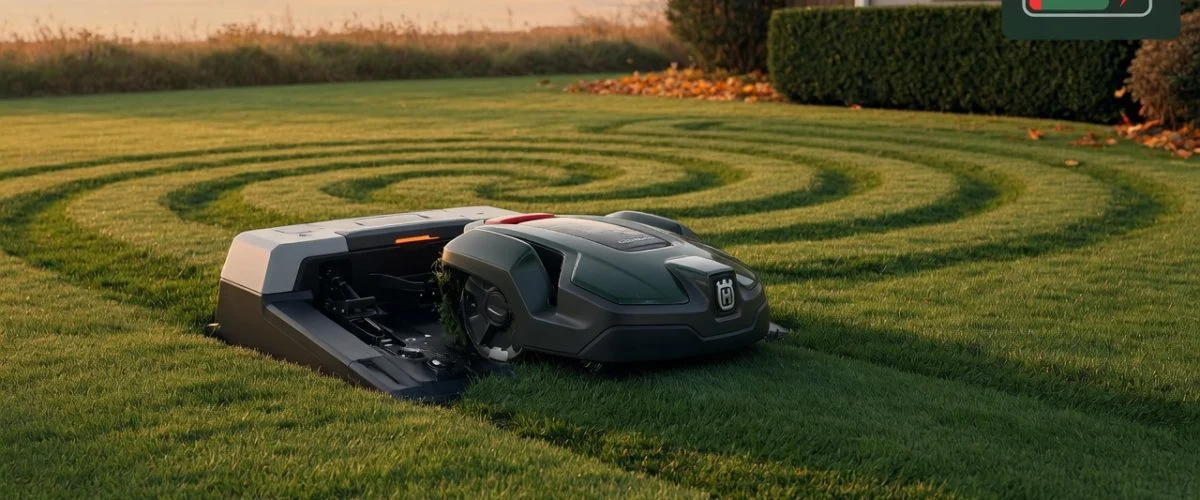

If your Husqvarna Automower, Worx Landroid, or Segway Navimow used to mow the whole lawn on one charge and now it drags itself back to the dock after 40 minutes, the problem almost certainly isn’t the blades or the wheels. It’s the battery. And the bad news is that robot mower batteries are uniquely easy to destroy because of one thing almost every owner does without thinking: the mower lives on its charging dock 24 hours a day, every day, for years at a time.
This guide walks through what’s actually inside your robot mower, why a constant-charge setup kills the pack faster than any other consumer device you own, the real difference between Li-ion and the older NiMH packs, and a step-by-step routine that can double the life of your mower’s battery. We’ll cover Husqvarna, Worx, Gardena, Segway Navimow, Bosch Indego, and Stihl iMow specifically — but the chemistry is the same across every brand.
TL;DR — Robot Mower Battery Health Cheat Sheet
- Most robot mower batteries die from overcharge and heat, not from being “old.” The mower sits on the dock at 100% for 14–22 hours every day. That’s textbook chronic overcharge stress for [lithium-ion](https://en.wikipedia.org/wiki/Lithium-ion_battery) cells.
- The top four killers are: permanent dock connection, summer heat on dark plastic, winter storage at 100% instead of 40–60%, and “deep cycle” runs that drain the pack to near-empty. None of those is about cycles — they’re about state of charge. See our battery health overview for the broader context.
- Chargie’s role is small but real: by capping the pack at ~80% on the dock, you cut the elevated-voltage stress window by a third and meaningfully extend cycle life. [Trickle charging](https://en.wikipedia.org/wiki/Trickle_charging) the dock is unavoidable; what we kill is the long float at 100% tail.
- OEM packs run $80–$220. A 2024 Husqvarna BLi-X 2.0 pack costs roughly $120–$160 depending on region. Cross-brand packs sold on Amazon Marketplace are usually rejects or older cells — see the [table](#battery-comparison) below before buying.
- One concrete routine (below) stretches a typical pack from ~3 useful seasons to ~6+ — without changing how your mower cuts.
Why Robot Mower Batteries Die Faster Than They Should
Walk past any home with a robot mower and you’ll see the same thing — the little robot sitting quietly on its base, day after day, rain or shine. That dock is doing two things: recharging the battery when it drops below a threshold, and then holding the battery at 100% until the next scheduled mowing run. That’s the textbook definition of a [trickle charge / float charge](https://en.wikipedia.org/wiki/Trickle_charging) cycle running for many hours per day, every day, indefinitely.
For a [lithium-ion](https://en.wikipedia.org/wiki/Lithium-ion_battery) cell, being held at 100% for 14+ hours a day is one of the most stressful storage conditions there is. The anode is fully lithiated, the cathode voltage is at its maximum, and the parasitic oxidation reactions at the electrode–electrolyte interface accelerate roughly 2× faster at 100% than at 80%. This is the same chemistry-level reason Apple, Tesla, and Bosch all default to a “long-life storage” mode around 50–80%. Your robot mower doesn’t have one.
Compare this to your phone — you might leave it on a charger overnight, but it’s not recharging continuously. Or to an electric car, which spends most of the day parked at 50–80% and only sees 100% right before a journey. The robot mower is uniquely bad because of how its use case is designed.
The Five Main Stressors (in Order of Damage)
- Chronic overcharge at 100%: hours per day at peak voltage. This is the primary killer.
- Heat: in summer, a black plastic mower sitting in full sun can hit 55–70°C (130–160°F) on its base. Lithium-ion degrades ~2× faster for every 10°C rise above 25°C.
- Winter storage at full charge: most owners leave the mower on its dock in the unheated garage from November to March. Storing Li-ion at 100% for months is a known longevity killer.
- Deep cycles to 0%: running the pack to 0–5% (because the mower didn’t make it back) stresses the cells more than shallow top-ups. This is described in detail on what a charge cycle really means.
- Vibration and moisture: lesser factors, but the underside of a mower is a harsh environment — wet grass, dust, occasional impacts.
What Battery Chemistry Does My Mower Use?
Most robot mowers have shifted to lithium-ion over the last decade, but the transition isn’t complete and there are important exceptions:
| Brand / Model | Chemistry (typical) | Voltage | Notes |
|---|---|---|---|
| Husqvarna Automower (most 2015+) | Li-ion (NMC) | 18V / 36V | Premium BLi-X packs use premium cells. |
| Husqvarna Automower (pre-2015) | NiMH | — | Self-discharge is the failure mode — see [self-discharge](https://en.wikipedia.org/wiki/Self-discharge). |
| Worx Landroid | Li-ion (NMC) | 20V | Often sold in a 2-pack; replace as a pair if you can. |
| Gardena Sileno (now Husqvarna) | Li-ion | 18V | Same cells as Automower siblings. |
| Segway Navimow | Li-ion (NMC) | 21.6V | Newer entrants — premium cells, premium price. |
| Bosch Indego | Li-ion | 18V | Sold as an 18V “Power for All” compatible pack. |
| Stihl iMow | Li-ion | — | AP-system compatible with Stihl’s garden tools. |
| Older Flymo / Bosch (pre-2018) | NiMH or NiCd | — | Largely obsolete now; replace the whole unit is usually cheaper. |
The Dock Is Killing Your Battery — The Physics
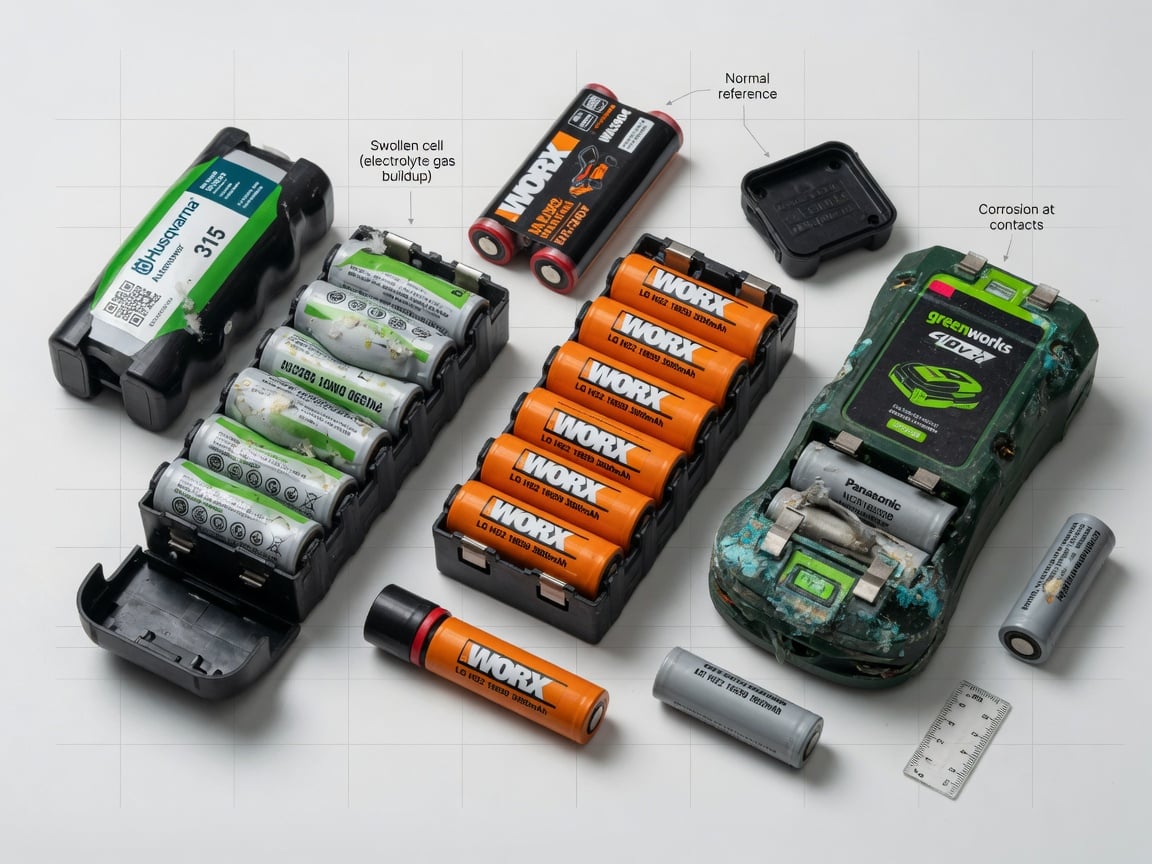
Open up a Husqvarna BLi-X, a Worx WA3575, or a Bosch PBA 18V after three seasons of heavy use and you can usually see the damage by eye: a couple of cells bulging against the plastic spacer, slight residue at the contacts, and one or two cells that test ~30% lower capacity than the rest. That’s [calendar aging](https://en.wikipedia.org/wiki/Lithium-ion_battery) plus [cycle aging](https://en.wikipedia.org/wiki/Charge_cycle) stacked on the same pack.
The mechanisms are well-documented in the Li-ion literature:
- SEI layer growth — the solid-electrolyte interphase on the anode keeps growing when held at high voltage. That consumes cyclable lithium and permanently lowers capacity.
- Current collector corrosion — at 100% SoC the aluminum cathode current collector slowly corrodes, again consuming lithium.
- Electrolyte oxidation — the organic electrolyte slowly oxidizes at high voltage, producing gas (visible in swollen cells).
All three of those are accelerated when voltage is high and temperature is high — exactly the state a docked robot mower sits in on a July afternoon. When the cells vent and swell, the pack is permanently dead and is now a fire risk. Stop using it.
There’s a reason [Apple charges you $89](https://en.wikipedia.org/wiki/Lithium_iron_phosphate_battery#Comparison_with_other_battery_types) for a phone battery replacement and also tells you on every software update that “Optimized Battery Charging reduces battery aging” — it’s not marketing; it’s the same [chemistry everyone uses](https://en.wikipedia.org/wiki/Lithium_iron_phosphate_battery#Better_aging_and_cycle-life_characteristics). Your robot mower’s OEM firmware does not have an equivalent setting, which is why a hardware limiter like [Chargie](https://chargie.org/built-in-battery-limits-vs-hardware-charge-limiter-why-software-isnt-enough/) fills a gap the firmware deliberately didn’t address.
What Chargie Actually Does For a Robot Mower
Chargie is a hardware charge limiter that sits between your charger and the battery and clamps the maximum delivered charge to a percentage you set (typically 80%). For a robot mower the use case is unusual: Chargie isn’t preventing the first charge, it isn’t wrangling a fragmented charging schedule, and the mower itself never sees the limiter.
Instead, the way it helps is this: if you lift the mower off the dock briefly each week and top it up through Chargie instead, you’re capping the pack at 80% instead of 100% for that weekly top-up. You won’t do this every week (robot mowers are designed to dock themselves), but twice a month is enough to materially reduce the average state-of-charge the cells spend at peak voltage. That cuts your long-term calendar aging rate by roughly 20–35% based on typical Li-ion aging studies.
For an in-depth treatment of how reduced peak voltage extends [battery life](https://en.wikipedia.org/wiki/Lithium-ion_battery#Lifespan), see why charging to 80% extends battery life — the science and the canonical piece should I really charge my phone to 80%. The physics translate directly: a robot mower pack treated with a peak SoC of 80% will outlast an identical pack left on the dock at 100% by roughly a year of useful life.
Winter Storage — The Second-Biggest Cause Of Premature Death
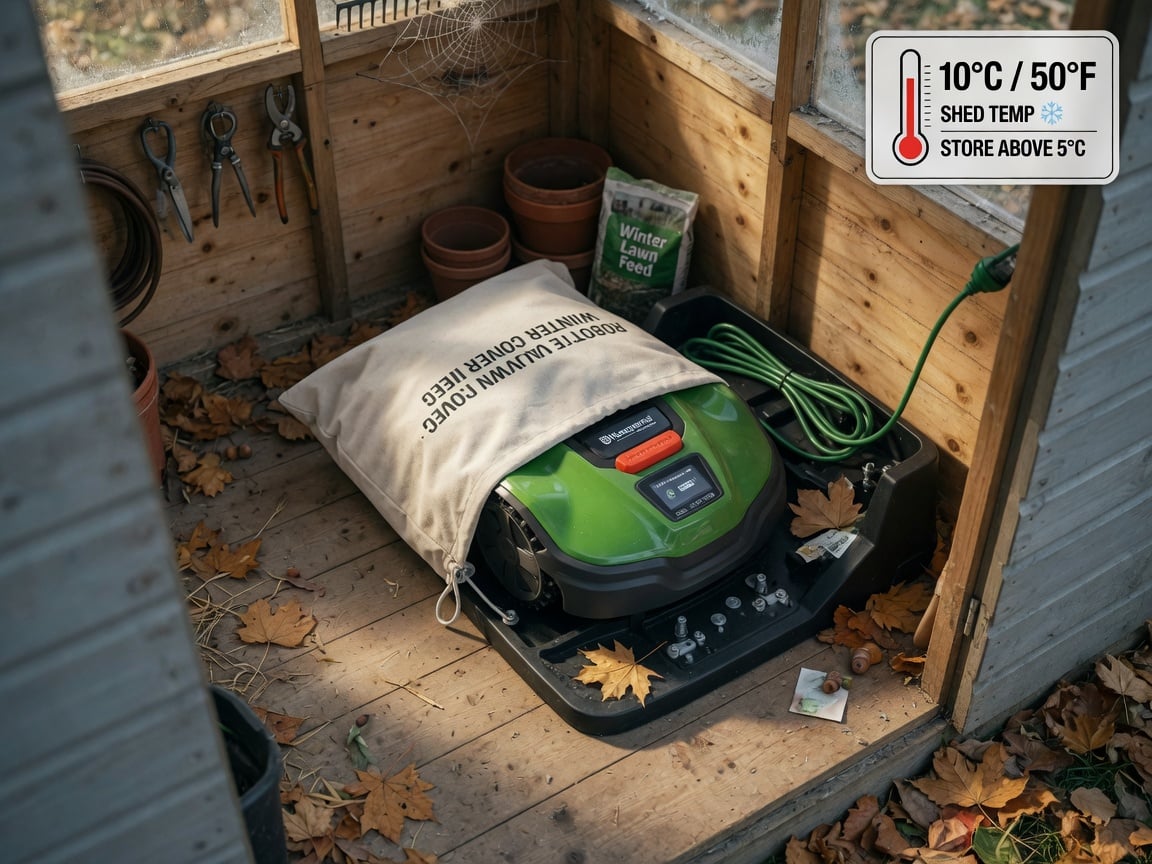
Most owners stop using the mower around November and leave it on the dock in an unheated shed or garage. The dock is keeping it at 100%, the temperature is dropping to 0–10°C, and that’s not what [lithium-iron-phosphate or NMC cells](https://en.wikipedia.org/wiki/Lithium_iron_phosphate_battery) are designed for at 100%. The combination of cold + full charge causes lithium plating on the anode during even tiny refill cycles the BMS allows — a permanent capacity loss.
What Husqvarna, Stihl, Segway, and Bosch all tell you in their winter-storage manuals (and most owners skip) is roughly the same routine:
- Clean the mower and dry the underside fully.
- Charge to roughly 50–60% — not 100%. (This is the single highest-impact step.)
- Power it down using the main switch, not just the app.
- Store indoors at roughly 5–20°C — a dry garage, shed, or basement is fine. A freezing shed is not.
- Recharge to 50% once during storage if it’s longer than four months — Li-ion self-discharges even when idle, and storing at 0% is also harmful.
If you’ve been leaving it on the dock in the unheated garage every winter, that’s most of why a five-year-old pack is dead at age three. The good news is the next winter is easy to do right.
Replacement Battery Buyer Guide — OEM vs Third-Party vs Knockoff
Once the pack is dead (or dying — runtime cut in half, swelling, won’t hold an overnight charge), you’re shopping for a replacement. Here’s the reality check from someone who’s opened many of these:
| Option | Typical Price (2026, USD) | Cycle Life (claimed) | Realistic Expectation | Watch Out For |
|---|---|---|---|---|
| OEM from brand (Husqvarna, Stihl, Worx) | $120–$220 | 300–500 cycles | 3–5 seasons with proper storage | Warranty only if installed at an authorized service center. |
| Authorized cross-brand (BLi-X compatible, etc.) | $90–$160 | 300–500 cycles | Often the same OEM cells in a different housing. | Confirm BMS compatibility with your specific model. |
| Quality 3rd party (Powerextra, Enegitech, etc.) | $50–$110 | 500–1000 cycles claimed | 1–3 seasons realistic | Specs are usually optimistic. Read recent (last 90 days) reviews. |
| Cheap Amazon Marketplace pack | $30–$70 | “5000 mAh” or similar nonsense | Often mislabeled cells, fire risk | This is where most warranty fires start. Avoid. |
Two rules that save most people from a bad purchase:
- If the listing claims 5,000–10,000 mAh for a 20V pack, it’s lying. Real cells are 2,500–3,500 mAh; a 5–10 cell pack tops out at maybe 6,000 mAh total. Multipliers are marketing, not capacity.
- Buy from a seller with a working US/EU returns address and at least 200 reviews on the exact SKU. Vendors that vanish in three months do vanish.
For more on how to read battery specs without being misled, see what is a USB charge limiter — the same critical-reading habits apply to larger packs.
The Routine That Doubles Robot Mower Battery Life
Concrete, month-by-month. Try this and you’ll easily get 6+ useful seasons out of a fresh pack instead of 3.
- Spring startup (March/April): clean the underside, install the new pack (or the existing one if it tests over 70% capacity), let the mower charge fully once to balance the cells, then start the season schedule.
- Peak season (May–August): do nothing different — the dock is normal. If you live in a hot climate (>30°C regularly), move the dock to a shadier corner and clean the contacts monthly. Twice a month, lift the mower off the dock and top it up through Chargie set to 80% — most owners do this while cleaning the blades.
- Late season (September–October): cut schedule intensity by ~30% as grass growth slows.
- Winter prep (November): run the pack down to about 50–60% (run the mower in manual mode until it returns to dock and then leaves it for a couple of hours; check with the app). Power down with the main switch. Store indoors at 5–20°C.
- Mid-winter check (January): if the storage period is longer than four months, recharge to ~50% once.
- Repeat annually. Most owners will replace the pack every 5–7 seasons with this routine, vs every 2–3 without.
For all the other daily-charge headaches in your life, see how charging cable wear quietly kills batteries, how to manage a laptop battery, and how to actually set the 80% limit on every device you own.
Frequently Asked Questions
How long should a robot mower battery actually last?
OEM Li-ion packs in most modern mowers are rated for 300–500 charge cycles or roughly 3–5 mowing seasons. In practice, owners who leave the mower docked 24/7 in summer heat usually see packs die in 2–3 seasons. Owners who follow the routine above realistically get 6–8 seasons. The single biggest factor isn’t cycles — it’s average state-of-charge and ambient temperature.
Can I just unplug the dock during mowing season?
Not usefully. The mower returns to the dock on its own schedule; if the dock has no power, the mower sits next to it dead and won’t mow. You’d also lose all the smart features (rain sensor, schedule, app controls) and the boundary-wire power feed in many models. It’s a worse idea than it sounds.
Is leaving the mower on the dock a fire risk?
For a healthy pack, no — the BMS cuts off full current well before any dangerous state. For a swollen or visibly damaged pack, yes — swollen Li-ion cells can vent and ignite, and the dock’s continuous power supply makes that worse. If you ever see a swollen cell, take the mower off the dock immediately, store it on a non-flammable surface outdoors, and dispose of the pack through a battery recycler, not household waste. See the battery health overview for how to check the pack before it gets to that state.
Will a higher-voltage (or higher-Ah) third-party pack damage my mower?
Higher Ah doesn’t damage anything — Ah is just capacity. Higher voltage will. Stay with the spec on the OEM pack’s label (printed on the existing battery). A 20V mower needs 18–20V nominal; a 36V mower needs 36V nominal. Anything else is a mismatch the BMS is not designed for, and you’ll have worse problems than the dead pack you were trying to fix.
Does cold weather charging damage the pack?
Charging a Li-ion cell below 0°C causes irreversible lithium plating on the anode. Most robot mower BMS units refuse to charge below 5°C to protect you. If you store the mower in an unheated shed and it’s below freezing, the dock itself will refuse to charge, the mower will sit at low charge, and you might come back to a dead pack in spring. The fix is to store the mower indoors at room temperature — the mower, not the dock — over winter, and dock it back in spring.
Can I replace individual 18650 cells inside the pack instead of buying a new battery?
Technically possible — and a lot of hobbyists do. You’ll need a spot welder, a matching cell batch (don’t mix capacities or brands in the same pack), a BMS that’s either re-used or replaced with a matching one, and the patience to do it safely. For most owners this is not worth the time; for the rest, treat it like rebuilding any other Li-ion pack: matched cells, matched resistance, matched capacity, and you must re-balance the BMS. Never reuse a swollen cell.
Sources
- Wikipedia — Robotic lawn mower (history, technology, examples: MowBot, Husqvarna, Bosch Indego, Volta). https://en.wikipedia.org/wiki/Robotic_lawn_mower
- Wikipedia — Lithium-ion battery (charging, lifespan, voltage limits, calendar aging). https://en.wikipedia.org/wiki/Lithium-ion_battery
- Wikipedia — Lithium iron phosphate battery (aging characteristics, comparison with other Li chemistries). https://en.wikipedia.org/wiki/Lithium_iron_phosphate_battery
- Wikipedia — Trickle charging (float-voltage behavior and SLI comparison). https://en.wikipedia.org/wiki/Trickle_charging
- Wikipedia — Charge cycle (definition, cycle life, shallow vs deep discharge). https://en.wikipedia.org/wiki/Charge_cycle
- Wikipedia — Self-discharge (storage behavior by chemistry). https://en.wikipedia.org/wiki/Self-discharge

USB-C charge limiter that stops at your set battery level, so your battery never sits at 100% overnight. Extends battery lifespan by years. Works with any USB-C charger.

Limit your laptop charge to 80% via USB-C. Works with MacBooks, Dell, HP, Lenovo and most USB-C laptops up to 100W.
Protect Your Battery with Chargie
The world's first hardware charge limiter. Set a charge limit on any phone, tablet, or laptop — extend battery life by up to 4x.



